EDIFIER R1855DB - Manual de Altavoces Activos de Estantería 2.0 Bluetooth
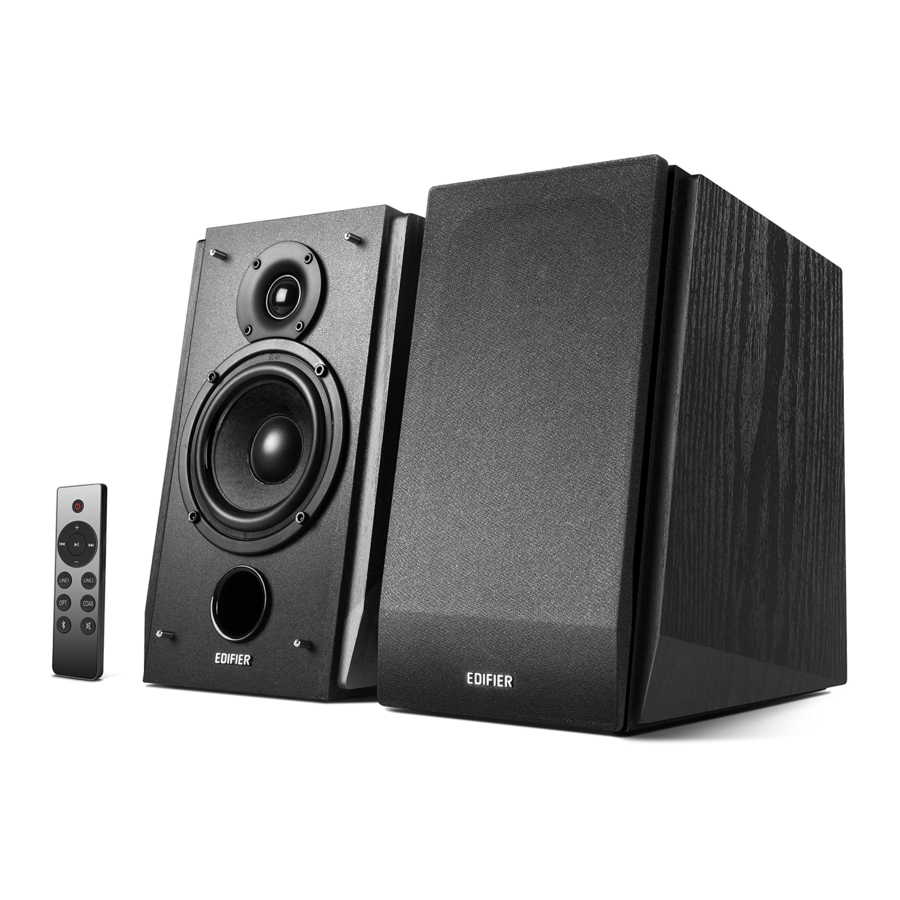
Contenido de la caja
 Nota: Las imágenes son solo para fines ilustrativos y pueden diferir del producto real.
Ilustración

- Dial de agudos (Treble dial)
- Dial de graves (Bass dial)
- Dial de volumen maestro (Master volume dial) Presione para cambiar la fuente de audio: Line In 1
![]() Line In 2
Line In 2 ![]() Optical
Optical ![]() Coaxial
Coaxial ![]() Bluetooth
Bluetooth
Mantenga presionado: Desconectar la conexión Bluetooth - Entrada de línea (Line In input)
- Entrada óptica (Optical input)
- Entrada coaxial (Coaxial input)
- Salida de graves (Bass output)
 Line In 2
 - Conectar al puerto del altavoz pasivo
- Interruptor de encendido (Power switch)
- Cable de alimentación (Power cord)
- Conectar al puerto del altavoz activo
- Indicador LED:
Azul: Modo Bluetooth
Verde: Modo Line In 1 (La luz parpadeará una vez)
Modo Line In 2 (La luz parpadeará dos veces)
Rojo: Modo óptico (La luz parpadeará una vez)
Modo coaxial (La luz parpadeará dos veces)
Control remoto

- Encendido/apagado (Power on/off)
- Subir volumen (Volume up)
- Pista anterior/pista siguiente (Previous track/next track) (Modo Bluetooth)
- Pausar/reproducir (Pause/play) (Modo Bluetooth)
- Bajar volumen (Volume down)
- Modo Line In 1
- Modo Line In 2
- Modo óptico (Optical mode)
- Modo coaxial (Coaxial mode)
- Modo Bluetooth Mantenga pulsado para desconectar Bluetooth
- Silenciar (Mute)
Carga de la batería (Battery loading):
Consulte la ilustración para abrir el compartimento de la batería, inserte la batería CR2032 y cierre el compartimento.


- No trague la batería; peligro de quemaduras químicas. (Don't swallow the battery; danger of chemical burn.)
- El producto incluye una batería tipo botón. (The product includes a wafer battery.) Tragar esta batería puede provocar lesiones o la muerte. (Swallowing this battery may lead to injury or death.) No coloque la batería nueva o vieja donde los niños puedan alcanzarla. (Do not place the new or old battery in where children can get to it.)
- No utilice el producto si la tapa de la batería no está o no está cerrada, y mantenga el mando a distancia fuera del alcance de los niños. (Don't use the product if the battery cover is missing or not closed, and keep the remote inaccessible to children.)
- Acuda al hospital inmediatamente si se traga la batería. (Please go to the hospital immediately if the battery is swallowed.)
Nota:
- No coloque el mando a distancia en lugares cálidos y húmedos. (Do not place the remote control in places that are hot and humid.)
- No cargue las pilas. (Do not charge the batteries.)
- Retire las pilas cuando no se utilicen durante un período de tiempo prolongado. (Remove the batteries when unused for a long period of time.)
- La batería no debe exponerse a un calor excesivo, como la luz solar directa, el fuego o similares. (The battery should not be exposed to excessive heat such as direct sun, fire or similar.)
- Peligro de explosión si la batería se sustituye incorrectamente. (Danger of explosion if battery is incorrectly replaced.) Sustituya la batería únicamente por el mismo tipo o por un tipo equivalente. (Replace only with the same or equivalent type.)
Conexión

Entrada de fuente de audio
Entrada de línea (Line In Input)

- Conecte el cable de audio al puerto de entrada Line In 1/Line In 2 en el panel posterior del altavoz activo (preste atención a los colores correspondientes), y el otro extremo a la fuente de audio (es decir, PC, teléfonos móviles, etc.). (Connect the audio cable to the Line In 1/Line In 2 input port on the rear panel of the active speaker (please pay attention to the corresponding colors), and the other end to the audio source (i.e. PC, mobile phones and etc.).)
- Pulse el botón "LINE1"/"LINE2" en el mando a distancia o pulse el dial de volumen maestro en el panel posterior del altavoz activo. (Press the "LINE1"/"LINE2" button on the remote control or press the master volume dial on the rear panel of the active speaker.) El indicador LED del altavoz activo se pone en verde: Modo Line In 1 (la luz parpadeará una vez), Modo Line In 2 (la luz parpadeará dos veces). (The LED indicator on the active speaker turns to green: Line In 1 mode (The light will flash once), Line In 2 mode (The light will flash twice).)
- Reproduzca música y ajuste el volumen a un nivel cómodo. (Play music and adjust the volume to a comfortable level.)
Entrada óptica / coaxial (Optical / Coaxial Input)

- Conecte el "cable de audio de fibra óptica" o el "cable coaxial" (no incluido) al puerto de entrada OPT/COAX en el panel posterior del altavoz activo y el dispositivo con entrada óptica y coaxial. (Connect the "Fiber optic audio cable" or "Coaxial cable" (not included) to OPT/COAX input port on the rear panel of the active speaker and device with optical and coaxial input.)
- Pulse el botón "OPT"/"COAX" en el mando a distancia o pulse el dial de volumen maestro en el panel posterior del altavoz activo. (Press "OPT"/"COAX" button on the remote control or press the master volume dial on the rear panel of the active speaker.)
La luz LED del altavoz activo se pone en rojo: modo óptico (la luz parpadeará una vez), modo coaxial (la luz parpadeará dos veces). (The LED light on the active speaker turns to red: optical mode (The light will flash once), coaxial mode (The light will flash twice).) - Reproduzca música y ajuste el volumen a un nivel cómodo. (Play music and adjust the volume to a comfortable level.)
Nota: En los modos óptico y coaxial, solo se puede decodificar la señal PCM con 44.1KHz/48KHz. (In optical and coaxial modes, only PCM signal with 44.1KHz/48KHz can be decoded.)
Modo Bluetooth

- Pulse el botón "
![]() " en el mando a distancia o el dial de volumen maestro del altavoz activo para seleccionar el modo Bluetooth. (Press "
" en el mando a distancia o el dial de volumen maestro del altavoz activo para seleccionar el modo Bluetooth. (Press "![]() " button on the remote control or the master volume dial of the active speaker to select Bluetooth mode.)
" button on the remote control or the master volume dial of the active speaker to select Bluetooth mode.)
El indicador LED se pone en azul. (LED indicator turns to blue.) - Encienda su dispositivo Bluetooth. (Turn on your Bluetooth device.) Busque y conéctese a "EDIFIER R1855DB". (Search and connect to "EDIFIER R1855DB".)
Desconectar Bluetooth: mantenga pulsado el dial de volumen maestro o el botón "![]() " en el mando a distancia durante unos 2 segundos para desconectar Bluetooth. (Disconnect Bluetooth: press and hold the master volume dial or the "
" en el mando a distancia durante unos 2 segundos para desconectar Bluetooth. (Disconnect Bluetooth: press and hold the master volume dial or the "![]() " button on the or remote control for about 2 seconds to disconnect Bluetooth.)
" button on the or remote control for about 2 seconds to disconnect Bluetooth.)
![]()
 " en el mando a distancia o el dial de volumen maestro del altavoz activo para seleccionar el modo Bluetooth. (Press "
 " en el mando a distancia durante unos 2 segundos para desconectar Bluetooth. (Disconnect Bluetooth: press and hold the master volume dial or the "
Nota:
- El Bluetooth en R1855DB solo se puede buscar y conectar después de cambiar el altavoz al modo de entrada Bluetooth. (The Bluetooth on R1855DB can only be searched and connected after switching the speaker to Bluetooth input mode.) La conexión Bluetooth existente se desconectará una vez que el altavoz se cambie a otra fuente de audio. (The existing Bluetooth connection will be disconnected once the speaker is switched to other audio source.) Cuando el altavoz se vuelve a cambiar al modo de entrada Bluetooth, el altavoz intentará conectarse al último dispositivo de fuente de audio Bluetooth conectado. (When the speaker is switched back to Bluetooth input mode, the speaker will try to connect to the last connected Bluetooth audio source device.)
- El código PIN es "0000" si es necesario. (Pin code is "0000" if it is needed.)
- Para disfrutar de todas las funciones de Bluetooth de este producto, asegúrese de que su dispositivo de fuente de audio tenga perfiles A2DP (Perfil de distribución de audio avanzado) y AVRCP (Perfil de control remoto de audio y video). (To enjoy all Bluetooth functions of this product, please ensure your audio source device has A2DP (Advanced Audio Distribution Profile) and AVRCP (Audio Video Remote Control Profile) profiles.)
- La conectividad y compatibilidad de Bluetooth pueden diferir entre los diferentes dispositivos de origen, dependiendo de las versiones de software de los dispositivos de origen. (Bluetooth connectivity and compatibility may differ amongst different source devices, depending on the software versions of source devices.)
Especificaciones

Resolución de problemas
Sin sonido
- Compruebe si el altavoz está encendido (ON). (Check if the speaker is ON.)
- Intente subir el volumen utilizando el control de volumen principal o el mando a distancia. (Try to turn up the volume using either the master volume control or remote control.)
- Asegúrese de que los cables de audio estén bien conectados y de que la entrada esté configurada correctamente en los altavoces. (Ensure the audio cables are firmly connected and the input is set correctly on the speakers.)
- Compruebe si hay una salida de señal desde la fuente de audio. (Check if there is a signal output from the audio source.)
No se puede conectar a través de Bluetooth
- Asegúrese de que el altavoz está cambiado a la entrada Bluetooth. (Make sure the speaker is switched to Bluetooth input.) Si está en otros modos de entrada de audio, Bluetooth no se conectará. (If it is in other audio input modes, Bluetooth will not connect.)
Desconéctese de cualquier dispositivo Bluetooth pulsando y manteniendo pulsado el botón "![]() ", y luego inténtelo de nuevo. (Disconnect from any Bluetooth device by pressing and holding the "
", y luego inténtelo de nuevo. (Disconnect from any Bluetooth device by pressing and holding the "![]() " button, then try again.)
" button, then try again.) - El rango de transmisión Bluetooth efectivo es de 10 metros; asegúrese de que la operación está dentro del rango. (Effective Bluetooth transmission range is 10 meters; please ensure that operation is within the range.)
- Pruebe con otro dispositivo Bluetooth para la conexión. (Try another Bluetooth device for connection.)
 ", y luego inténtelo de nuevo. (Disconnect from any Bluetooth device by pressing and holding the "
El R1855DB no se enciende
- Compruebe si la alimentación principal está conectada, o si el enchufe de la pared está encendido. (Check if main power is connected, or if the wall outlet is switched on.)
Ruido proveniente de los altavoces
- Los altavoces EDIFIER generan poco ruido, mientras que el ruido de fondo de algunos dispositivos de audio es demasiado alto. (EDIFIER speakers generate little noise, while the background noise of some audio devices are too high.) Desconecte los cables de audio y suba el volumen, si no se oye ningún sonido a 1 metro de distancia del altavoz, entonces no hay ningún problema con este producto. (Please unplug audio cables and turn the volume up, if no sound can be heard at 1 meter away from the speaker, then there is no problem with this product.)
Para obtener más información sobre EDIFIER, visite www.edifier.com
Para consultas sobre la garantía de EDIFIER, visite la página del país correspondiente en www.edifier.com y revise la sección titulada Términos de la garantía. (Warranty Terms.)
USA and Canada: service@edifier.ca
South America: Please visit www.edifier.com (English) or www.edifierla.com (Spanish/Portuguese) for local contact information.

@Edifierglobal

@Edifier_Global

@Edifier_Global
Model: EDF100023
Edifier International Limited
P.O. Box 6264
General Post Office
Hong Kong
Tel: +852 2522 6989
Fax: +852 2522 1989
www.edifier.com
© 2021 Edifier International Limited. All rights reserved. Printed in China
AVISO:
Por la necesidad de mejora técnica y actualización del sistema, la información contenida en este documento puede estar sujeta a cambios de vez en cuando sin previo aviso. (For the need of technical improvement and system upgrade, information contained herein may be subject to change from time to time without prior notice.)
Los productos de EDIFIER se personalizarán para diferentes aplicaciones. (Products of EDIFIER will be customized for different applications.) Las imágenes e ilustraciones que se muestran en este manual pueden ser ligeramente diferentes del producto real. (Pictures and illustrations shown on this manual may be slightly different from actual product.) Si se encuentra alguna diferencia, prevalecerá el producto real. (If any difference is found, the actual product prevails.)

Referencias


Descargar el manual
Aquí puede descargar la versión PDF completa del manual. Puede contener instrucciones de seguridad adicionales, información de garantía, reglas de la FCC, etc.
Descargar EDIFIER R1855DB - Manual de Altavoces Activos de Estantería 2.0 Bluetooth


