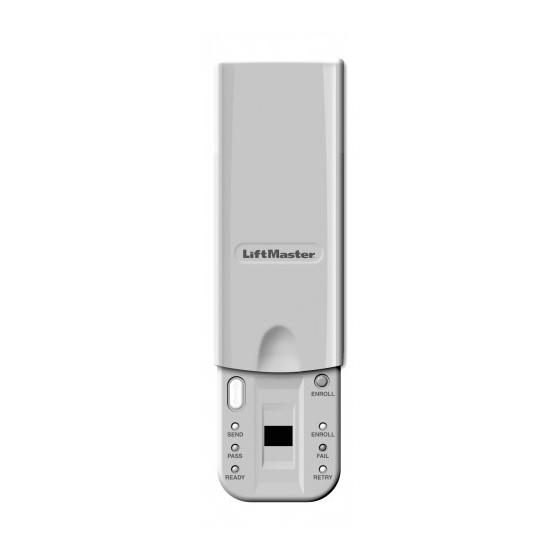
Chamberlain LiftMaster 379E Manual Del Usuario
Tabla de contenido
Idiomas disponibles
Idiomas disponibles
Enlaces rápidos
Model 379E Fingerprint Keyless Entry
OVERVIEW
For use with any Chamberlain 433MHz Rolling Code garage door
opener having an orange "learn" button.
The system uses biometric technology that enables an
authorized user to gain access by scanning their fingerprint.
The sensor strip on the unit makes a numeric template of the
fingerprint that is unique to that user. The unit's memory can
store up to ten fingerprints.
• The term "enroll" refers to scanning the fingerprint so the
device will recognize the user.
• The term "swipe" refers to the movement of the finger across
the sensor strip.
• The term "LED" stands for Light Emitting Diode. There are
6 LEDs located on the Fingerprint Keyless Entry.
When unit is on, it is programmed to shut off after a short
period of time. The unit's sensor strip is sensitive so it is
important to read the Tips for Success before attempting to
use the Fingerprint Keyless Entry.
NOTE: Do not attempt swiping your finger across sensor strip
until you are ready to enroll as you may inadvertently begin the
enroll process.
STEP 1 INSTALL THE UNIT
1. Remove cover.
2. Fasten bottom screw to mounting surface. Allow 1/8"
(3 mm) to protrude above surface. Position unit on screw
head and adjust for snug fit.
3. Fasten top screw. Replace cover.
To prevent possible SERIOUS INJURY or DEATH from a moving gate or
garage door:
• Install Keyless Entry Control within sight of the garage door, out of reach
of children at a minimum height of 5 feet (1.5 m), and away from all mov
ing parts of door.
• ALWAYS keep remote controls out of reach of children. NEVER permit
children to operate, or play with remote control transmitters.
• Activate gate or door ONLY when it can be seen clearly, is properly
adjusted, and there are no obstructions to door travel.
• ALWAYS keep gate or garage door in sight until completely closed.
NEVER permit anyone to cross path of moving gate or door.
TIPS FOR SUCCESS
CORRECT
1. Make sure finger is clean and dry. Place
finger flat above the sensor strip with
the top knuckle above the sensor.
2. Swipe finger straight down keep-
ing
firm contact with the sensor. The
swipe should be a slow, constant
speed.
SPECIAL NOTES: Use the same finger for
every swipe. It is important to swipe finger slowly and firmly as
this is the reason most swipes fail.
Swipe finger straight down
keeping firm contact with
Start swipe with
the sensor.
the top knuckle
above the
sensor strip.
Sensor Strip
INCORRECT
• Do not bend finger during swipe as this will only scan the tip of
your finger.
• Swipe finger straight down, not at an angle.
• Swipe flat, not tilted or rolled to one side.
Sensor Strip
The scan
should end
at the tip of
finger.
Tabla de contenido

Manuales relacionados para Chamberlain LiftMaster 379E


Resumen de contenidos para Chamberlain LiftMaster 379E
-
Página 21: Generalidades
GENERALIDADES cochera, fuera del alcance de los niños a una altura mínima de 1.5 m Para uso con cualquier Automatismo de Garage Chamberlain (5 pies), y alejado de las partes móviles de la puerta. 433MHz Rolling Code con botón naranja de "memorización". -
Página 22: Paso 3 Registre A Usuarios Adicionales
REFERENCIA PASO 3 REGISTRE A USUARIOS ADICIONALES NOTA: El dispositivo puede almacenar hasta diez huellas dacti- Tapa lares de una vez. Un usuario registrado debe pasar el dedo primero para registrar a un usuario nuevo. Botón Resend (Reenviar): Cuando se oprime este 1. -
Página 23: Paso 4 Programación
PASO 4 PROGRAMACIÓN PASO 5 OPERACIÓN 1. Abra la tapa y espere a que se encien da el LED Ready. ENROLL – 180 s 60 s SEND 120 s ENROLL PASS FAIL READY RETRY 2. Pase el dedo lenta y firmemente por el sensor. -
Página 24: Resolución De Problemas
BORRAR/REAJUSTAR • Si la huella digital es memorisada, pero la unidad no se deja programmar sobre el automatismo: • Para borrar usuarios: - Asegurase que la unidad dispose de un boton de color naranja. NOTA: Al borrar un usuario se borrarán TODAS las huellas digi- Si no, el automatismo no esta compatible.