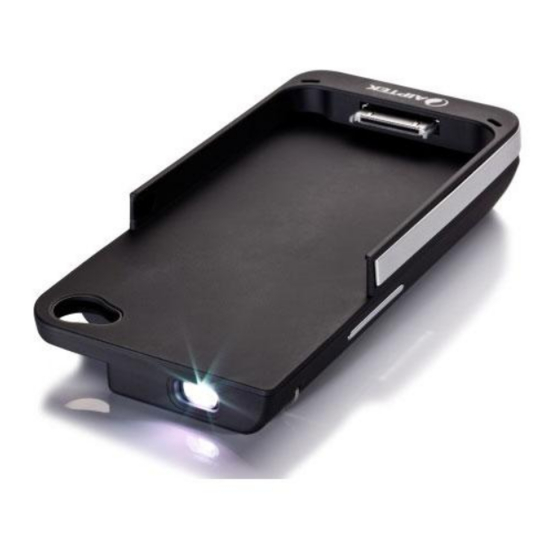
AIPTEK MobileCinema i15 Manual De Usuario
Tabla de contenido
Idiomas disponibles
Idiomas disponibles
Enlaces rápidos
i15's User's Manual
Care and Safety Information
1. Keep the device and packaging materials out of the reach of infants
and children.
2. Avoid subjecting the power adapter and other contacts to dripping or
splashing water and dry your hands before you use it. Do not place
objects filled with liquids such as vases, etc. on or near the device.
3. Make sure that the used power outlet is always readily available and
never hidden. In case of emergency, use the power adapter to
separate the device from the power network.
4. Keep your device away from all flames such as candles and do not
set them up in the vicinity of the device.
5. Keep the unit at least 10 cm away from other objects. Make sure the
ventilation is not covered by newspapers, tablecloths, curtains, etc.
6. For your own safety, do not use the projector during thunderstorms
or lightning.
7. Relative Humidity is 5~35°C, 80% (Max.), non-condensing.
8. The battery is integrated with the device. Do not dissemble and modify.
The battery should be replaced by qualified service staff only.
9. Ensure that the ambient room temperature is within -10~55°C
10. During the operation, this product may heat lightly, which is normal.
11. Wait before using if the device has been moved from a cold location
into a warm one. Any condensation that has formed may in certain
circumstances destroy the device. As soon as the device has
reached room temperature it can be used without risk.
12. Handle the product with care. Avoid contact with sharp objects.
Keep device away from metallic objects.
13. Place the projector on a flat surface. Any collision or falling to the
ground is likely to damage the product.
14. Do not drop or disassemble the product otherwise the warranty
voids. Opening or removing covers may expose you to dangerous
voltage or other hazards. Refer all servicing to qualified service
personnel.
15. Use only the accessories supplied by the
manufacturer.
16. Both product and user's manual are
subject to further improvement or
supplement without further notice.
17. Avoid facing directly into the projector's
lens.
I
Tabla de contenido

Manuales relacionados para AIPTEK MobileCinema i15


Resumen de contenidos para AIPTEK MobileCinema i15
-
Página 3: Información De Seguridad
i15’s User’s Manual Entretien et précaustion d’emploi (FR) 1. Attention - Evitez de vous placer en face de la lentille du vidéo projecteur. 2. Evitez tout contact avec de l’eau, et gardez vos mains sèches lors de l’utilisation. 3. Assurez-vous que la température de la pièce est comprise entre -10 et 55°C 4. - Página 5 i15’s User’s Manual (DE) Wenn die Lebensdauer des Produkts zu Ende kommt, lassen Sie bitte möglichst alle Komponenten recyceln. Bitte recyceln Sie dieses Produkt ordnungsgemäß, wenn es nicht mehr verwendet werden kann. Es kann nicht als Haushaltsmüll behandelt werden. Es muss separat über die verfügbaren Rücknahme- und Sammelsysteme entsorgt werden.
-
Página 22: Usuario I15'S Manual
Usuario i15’s Manual Presentación del Producto 1. Vista General del Producto Conector de 30 pines Rueda de Lentes Interruptor de volumen enfoque Interruptor de modo Puerto USB Indicador LED de modo Modo del Proyector (Presione durante 3 seg. a la dcha. para apagar o encender la proyección) Modo de carga de batería... -
Página 23: Indicador Led De Modo
Usuario i15’s Manual 2. Indicador LED de Modo Indicador LED Modo Rojo Cargando el producto o el iPhone Rojo y Verde Carga completa Azul parpadeando Modo proyección lentamente La luz azul El voltaje de la batería parpadea sea bajo. El dispositivo rápidamente se apagará... -
Página 24: Proyección De Vídeo
Usuario i15’s Manual 4. Proyección de Vídeo A. Conecte el producto al iPhone. B. Encienda el producto presionando el Interruptor de Modo a la derecha durante 3 segundos hasta que la pantalla de proyección azul se encienda. C. Seleccione el vídeo en el iPhone y pulse la tecla “Reproducer” para que se reproduzca el vídeo. -
Página 25: Especificaciones
Usuario i15’s Manual 6. Especificaciones Elemento Descripción Technología DLP RGB LED Lumens Máx. 15 lumens Resolución 640 x 360 (nHD) Relación de aspecto 16:9 Relación de contraste 1000:1 Tamaño de la imagen 25 cm ~ 152 cm (10” ~ 60” Diagonal) proyectada Distancia de proyección 49 cm ~ 292 cm... - Página 26 دﻟﻴﻞ اﻟﻤﺴﺘﺨﺪم ﻣﻘﺪﻣﺔ اﻟﻤﻨﺘﺞ ﻣﻘﺪﻣﺔ . 1 ﻧﺒﺬة ﻋﻦ اﻟﻤﻨﺘﺞ ﻧﺒﺬة ﻋﻦ اﻟﻤﻨﺘﺞ دﺑﻮ ﺳ ًﺎ ﻣﻮﺻﻞ ﻳﺤﺘﻮي ﻋﻠﻰ ﻋﺪﺳﺔ ﻋﺠﻠﺔ اﻟﺘﺮآﻴﺰ ﻣﻔﺘﺎح ﺿﺒﻂ اﻟﺼﻮت ﻣﻔﺘﺎح اﻟﻮﺿﻊ ﻣﻨﻔﺬ ﻣﺆﺷﺮ وﺿﻊ اﻟﻤﺼﺒﺎح وﺿﻊ ﺟﻬﺎز اﻟﻌﺮض ادﻓﻊ اﻟﺰر ﺟﻬﺔ اﻟﻴﻤﻴﻦ ﺛﻮا ن ٍ ﻟﺘﺸﻐﻴﻞ أو ﻟﻤﺪة...
- Página 27 دﻟﻴﻞ اﻟﻤﺴﺘﺨﺪم ﻣﺆﺷﺮ وﺿﻊ اﻟﻤﺼﺒﺎح اﻟﻮﺿﻊ ﻣﺆﺷﺮ اﻟﻤﺼﺒﺎح iPhone ﺷﺤﻦ اﻟﻤﻨﺘﺞ أو هﺎﺗﻒ أﺣﻤﺮ اآﺘﻤﻞ اﻟﺸﺤﻦ أﺣﻤﺮ وأﺧﻀﺮ وﺿﻊ اﻟﻌﺮض اﻟﻀﻮء اﻷزرق إﻳﻘﺎف اﻟﺘﺸﻐﻴﻞ ﻟﻠﺘﺸﻐﻴﻞ اﻟﺒﻄﻲء ﺳﻴﺘﻢ إﻳﻘﺎف ﺗﺸﻐﻴﻞ ﺟﻬﺪ اﻟﺒﻄﺎرﻳﺔ ﻣﻨﺨﻔﺾ ﺳﺮﻋﺔ وﻣﻴﺾ ﻣﺼﺒﺎح ﻵﻟﺔ ﺧﻼل دﻗﻴﻘﺔ واﺣﺪة ا اﻟﻀﻮء...
- Página 28 دﻟﻴﻞ اﻟﻤﺴﺘﺨﺪم ﻓﻴﺪﻳﻮ اﻟﻌﺮض iPhone وﺻﻞ اﻟﻤﻨﺘﺞ وهﺎﺗﻒ . أ ﺛﻮاﻧﻲ ﺣﺘﻰ ﺗﺼﺒﺢ ﺷﺎﺷﺔ اﻟﻌﺮض ﺷﻐﻞ اﻟﻤﻨﺘﺞ ﺑﺎﻟﻀﻐﻂ ﻋﻠﻰ ﻣﻔﺘﺎح اﻟﻮﺿﻊ ﺟﻬﺔ اﻟﻴﻤﻦ ﻟﻤﺪة . ب اﻟﺰرﻗﺎء ﻣﻮﺟﻮدة ﻓﻲ اﻟﻌﺮض ﻟﺘﺸﻐﻴﻞ " ﺗﺸﻐﻴﻞ " ﻔﺘﺎح واﺿﻐﻂ ﻋﻠﻰ اﻟﻤ iPhone ﺣﺪد ﻣﻠﻒ اﻟﻔﻴﺪﻳﻮ اﻟﻤﻮﺟﻮد ﻋﻠﻰ اﻟﻬﺎﺗﻒ .
- Página 29 دﻟﻴﻞ اﻟﻤﺴﺘﺨﺪم اﻟﻤﻮاﺻﻔﺎت اﻟﻮﺻﻒ اﻟﻌﻨﺼﺮ ﻣﺼﺒﺎح اﻟﻤﻌﺎﻟﺠﺔ اﻟﺮﻗﻤﻴﺔ ﻟﻠﻀﻮء اﻷﺣﻤﺮ واﻷﺧﻀﺮ اﻟﺘﻜﻨﻮﻟﻮﺟﻴﺎ واﻷزرق وﺣﺪة ﺗﺪﻓﻖ اﻟﻀﻮء ﺣﺪ أﻗﺼﻰ اﻹﺿﺎءة دﻗﺔ ﻋﺮض ﻋﺎﻟﻴﺔ × اﻟﺪﻗﺔ 16:9 ﻧﺴﺒﺔ اﻟﻄﻮل إﻟﻰ اﻻرﺗﻔﺎع 1000:1 ﻧﺴﺒﺔ اﻟﺘﺒﺎﻳﻦ ﺑﻮﺻﺔ ﻗﻄﺮي ﺳﻢ ﺳﻢ ﺣﺠﻢ ﺻﻮرة اﻟﻌﺮض س ﺳﻢ...