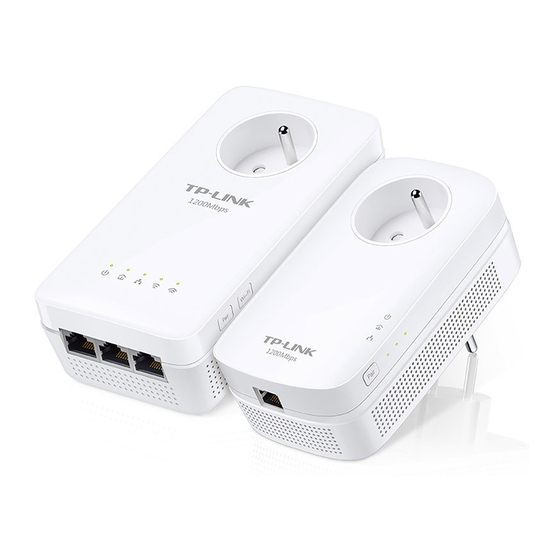
TP-Link CPL1300 Guía De Instalación Rápida
Tabla de contenido
Idiomas disponibles
Idiomas disponibles
Enlaces rápidos
TP-Link Technologies Co., Ltd.
South Building(floors 1,3,4,5) and 28(floors 1-4), Central Science
& Technology Park, Shennan Rd, Nanshan, Shenzhen, China
TP-Link Deutschland GmbH
Robert-Bosch-Straße 9, 65719 Hofheim am Taunus, Germany
TP-Link UK Limited
Unit 2 & 3 Riverview (142-144), Cardiff Road, Reading, RG1 8EW
TP-Link Italia S.r.l.
Via Gobetti 2/A 20063 Cernusco sul Naviglio (MI)
16-18 avenue Morane Saulnier, 78140 Vélizy-Villacoublay, France
TP-Link France SARL
TPLink Bilgi Teknolojileri Tic. Ltd. Şti.
Şerifali Mevkii, Barbaros Cad. Söyleşi Sokak. No:15/2 Kat:3/4
34775 Ümraniye/İstanbul
TP-Link IBERIA, S.L.
Calle Quintanavides 17, 3ºE, 28050 Madrid, Spain
TP-Link Netherlands B.V.
Archimedesbaan 18, 3439 ME Nieuwegein
TP-Link (Nordic) AB
Forumvägen 14, Plan 13, 131 53 Nacka, Sweden
TP-Link Hellas Ltd.
Marathonodromou 77, Marousi 151 24, Greece
NWS.TP-Link Portugal, Unipessoal, Lda.
Avenida da Liberdade, n°245, 7°E, 1250-143 Lisboa, Portugal
TP-Link Technologies Co., Ltd.
Specifications are subject to change without notice. TP-Link is a registered trademark of TP-Link
Technologies Co., Ltd. Other brands and product names are trademarks or registered trademarks of
their respective holders.
No part of the specifications may be reproduced in any form or by any means or used to make any
derivative such as translation, transformation, or adaptation without permission from TP-Link
Technologies Co., Ltd. Copyright © 2018 TP-Link Technologies Co., Ltd. All rights reserved.
MADE IN CHINA
7106507825 REV2.1.1
Quick Installation Guide
Powerline Extender
Tabla de contenido

Manuales relacionados para TP-Link CPL1300


Resumen de contenidos para TP-Link CPL1300
-
Página 2: Tabla De Contenido
CONTENTS 01 / Deutsch 05 / English 09 / Español 13 / Ελληνικά 17 / Français 21 / Italiano 25 / Português 29 / Suomi 33 / Nederlands 37 / Svenska 41 / Norsk 45 / Dansk... - Página 11 Español Powerline Internet WAN LAN Adaptador Extensor 1. Conecte el adaptador a un puerto LAN de su router utilizando un cable Ethernet. 2. Conecte los dispositivos powerline en un enchufe de pared cercanos el uno del otro y en el mismo circuito eléctrico. 3.
-
Página 12: Copiar Configuración Wi-Fi Del Router Al Extensor
Español 4. Recoloque el extensor powerline en una nueva ubicación. Conéctese al Wi-Fi utilizando el SSID y contraseña de la etiqueta del producto. * Un parpadeo o encendido en rojo en el LED Powerline indicará que la intensidad de señal es pobre. Mueva el extensor a otra ubicación. 5. - Página 13 Español 1. Conecte el extensor powerline cerca de su router. Presione el botón WPS en su router. 2. Dentro de un intervalo de 2 minutos, presione el botón Wi-Fi en el extensor durante 1 segundo. 3. Cuando en el extensor parpadeen rápidamente el LED Wi-Fi de 2.4GHz y el LED Wi-Fi de 5GHz...
- Página 14 Español FAQ (Preguntas Frecuentes) Q1. ¿Cómo restauro mi extensor powerline? A. Con el extensor encendido, presione y mantenga pulsado el botón de Reset (utilice un pin si tiene un agujero) hasta que todos los LEDs se apaguen. Cuando todos los LEDs se inicien de nuevo, el proceso de restauración estará...
- Página 51 Die Original-EU-Konformitätserklärung kann in englischer Sprache hier heruntergeladen werden: http://www.tp-link.com/en/ce. English TP-Link hereby declares that the device is in compliance with the essential requirements and other relevant provisions of directives 2014/53/EU, 2009/125/EC and 2011/65/EU. The original EU declaration of conformity may be found at http://www.tp-link.com/en/ce.
-
Página 55: Español
TP-Link warrants the TP-Link branded hardware product contained in the original packaging against defects in materials and workmanship when used normally in according with TP-Link’s guidelines for a period of THREE YEARS form the date of original retail purchase by the end-user purchaser. -
Página 56: Français
TP-Link garantiza el producto de hardware que porta la marca TP-Link contenido en la caja original contra defectos en los materiales y mano de obra bajo condiciones normales de uso de acuerdo con las directrices de TP-Link por un periodo de TRES AÑOS desde la fecha original de compra en la tienda por parte del usuario final adquiriente.