Sony RM-EZ4 - Manual del Remote Commander
- 1 Configuración del dispositivo
- 2 Resolución de problemas
- 3 Información de atención al cliente
- 4 Guía de inicio
- 5 Búsqueda del código correcto
- 6 Funcionamiento de los componentes
- 7 Descripciones de los botones del control remoto
- 8 Especificaciones
- 9 Números de código de componente
- 10 Descargar el manual
- 11 En otros idiomas
Configuración del dispositivo
Acerca de la configuración del dispositivo
El "Commander" (Controlador) está configurado en la fábrica para operar componentes de la marca Sony. Sin embargo, incluso si tiene la intención de utilizar el "Commander" (Controlador) con un componente Sony, es posible que aún deba configurar el "Commander" (Controlador) para él, según el componente.
Para configurar el "Commander" (Controlador) para usarlo con componentes de otros fabricantes (que no sean Sony), o para usarlo con un componente que no esté preestablecido en la fábrica, deberá seguir las instrucciones de este manual para preestablecer el "Commander" (Controlador) con el número de código correcto para su componente. (Consulte "Startup Guide" (Guía de inicio) y "Component Code Numbers" (Números de código de componente)).
| Component Select button (Botón de selección de componente) | Preset component(s) (Componente(s) preestablecido(s)) | Factory setting (Configuración de fábrica) |
| TV | TV | Sony TV |
| CBL/SAT | Cable box/Digital satellite receiver/TV (Decodificador de cable/Receptor de satélite digital/TV) | Sony Cable box |
Note (Nota)
El "Commander" (Controlador) se puede configurar para operar solo un componente por botón, a menos que sus números de código sean los mismos. Por ejemplo, no puede configurar el "Commander" (Controlador) para operar un Sony TV y un Panasonic TV simultáneamente (porque usan diferentes números de código).
Instalación de las baterías

Abra el compartimento de las baterías e inserte dos baterías tamaño AA (R6) (no incluidas).
Asegúrese de alinear los signos + y – en las baterías con los signos + y – en el compartimento de las baterías.
When to replace the batteries (Cuándo reemplazar las baterías)
Before replacing the batteries, have new ones ready beforehand. (Antes de reemplazar las baterías, tenga nuevas listas de antemano).
En condiciones normales, las baterías durarán hasta un año. Si el "Commander" (Controlador) no funciona correctamente, es posible que las baterías estén agotadas. Reemplace las baterías por otras nuevas.
Notes (Notas)
- Replace both batteries with new ones. (Reemplace ambas baterías por otras nuevas).
- Do not take more than3 minutes to replace the batteries; otherwise, your code number settings will be erased. (No tarde más de 3 minutos en reemplazar las baterías; de lo contrario, se borrará la configuración de su número de código).
- Do not mix old batteries with new ones, or mix different battery types together. (No mezcle baterías viejas con nuevas, ni mezcle diferentes tipos de baterías).
- If the electrolyte inside the battery should leak, wipe the contaminated area of the battery compartment with a cloth and replace the old batteries with new ones. To prevent the electrolyte from leaking, remove the batteries when you plan to not use the Commander for a long period of time. (Si el electrolito dentro de la batería se fuga, limpie el área contaminada del compartimento de la batería con un paño y reemplace las baterías viejas por otras nuevas. Para evitar que el electrolito se escape, retire las baterías cuando planee no usar el "Commander" (Controlador) durante un largo período de tiempo).
Resolución de problemas
Si tiene problemas para configurar o usar el "Commander" (Controlador):
- When setting up the Commander, carefully go through the procedures described in "Startup Guide." If the code that is listed first for your component does not work, try other codes for that component – in the order in which they are listed. If all the codes fail to work (or if your component is not listed in this manual), try using the procedures in "Searching for the Correct Code." (Al configurar el "Commander" (Controlador), revise cuidadosamente los procedimientos descritos en "Startup Guide" (Guía de inicio). Si el código que aparece primero para su componente no funciona, pruebe con otros códigos para ese componente, en el orden en que aparecen. Si todos los códigos no funcionan (o si su componente no figura en este manual), intente utilizar los procedimientos en "Searching for the Correct Code" (Búsqueda del código correcto)).
- Make sure that you are aiming the Commander directly at the component, and that there are no obstructions between the Commander and the component. (Asegúrese de que está apuntando con el "Commander" (Controlador) directamente al componente y de que no haya obstrucciones entre el "Commander" (Controlador) y el componente).
- Make sure the batteries you are using are not worn out, and that they are inserted correctly. (Asegúrese de que las baterías que está utilizando no estén gastadas y de que estén insertadas correctamente).
- Check that the appropriate TV or CBL/SAT button is pressed. (Compruebe que se pulse el botón TV o CBL/SAT adecuado).
- Check that the component has infrared remote capability. For example, if your component did not come with a remote control, it probably is not capable of being controlled by the Remote Commander. (Compruebe que el componente tenga capacidad de control remoto por infrarrojos. Por ejemplo, si su componente no venía con un control remoto, probablemente no pueda ser controlado por el "Remote Commander" (Controlador remoto)).
- Should any problem persist, reset the Commander to the factory setting by pressing the
![]() , INPUT (ENTRADA) and VOL – buttons simultaneously. (Si persiste algún problema, restablezca el "Commander" (Controlador) a la configuración de fábrica presionando los botones
, INPUT (ENTRADA) and VOL – buttons simultaneously. (Si persiste algún problema, restablezca el "Commander" (Controlador) a la configuración de fábrica presionando los botones ![]() , INPUT (ENTRADA) y VOL – simultáneamente).
, INPUT (ENTRADA) y VOL – simultáneamente).
 , INPUT (ENTRADA) and VOL – buttons simultaneously. (Si persiste algún problema, restablezca el "Commander" (Controlador) a la configuración de fábrica presionando los botones
 Información de atención al cliente
For the customers in the U.S.A. (Para los clientes en los EE. UU.)
After you have read through this manual, if you still cannot get the Remote Commander to work properly, call the Sony Customer Support Helpline at 1-800-822-2217. (Después de leer este manual, si aún no puede hacer que el "Remote Commander" (Controlador remoto) funcione correctamente, llame a la línea de ayuda de atención al cliente de Sony al 1-800-822-2217).
Guía de inicio

If the SET indicator flashes five times before lighting up, it means that the setup is incomplete. Confirm the code number and start over from Step 4. (Si el indicador SET parpadea cinco veces antes de encenderse, significa que la configuración está incompleta. Confirme el número de código y comience de nuevo desde el paso 4).
If you do not input anything into the Remote Commander within 20 seconds between each step, or if you press SET while setting the code number, the setup procedure will be canceled. Start over from Step 2. (Si no ingresa nada en el "Remote Commander" (Controlador remoto) dentro de los 20 segundos entre cada paso, o si presiona SET mientras configura el número de código, se cancelará el procedimiento de configuración. Comience de nuevo desde el paso 2).
Búsqueda del código correcto

It is possible to find a code number available for a component that does not have one in "Component code numbers." (Es posible encontrar un número de código disponible para un componente que no tiene uno en "Component code numbers" (Números de código de componente)).
Before starting the Search function (Antes de iniciar la función de búsqueda)
Set each component to the following status so that the Search function works effectively. (Configure cada componente al siguiente estado para que la función de búsqueda funcione de manera efectiva).

* If any of these components are assigned to any of the Component Select buttons, you can set a component code using the Search function. (Si alguno de estos componentes está asignado a alguno de los botones de selección de componente, puede establecer un código de componente mediante la función de búsqueda).
- Press and hold SET for more than two seconds. The SET indicator lights up. (Mantenga presionado SET durante más de dos segundos. El indicador SET se ilumina).
- Press the appropriate Component Select button. The SET indicator lights up. (Presione el botón de selección de componente apropiado. El indicador SET se ilumina).
- Press CH + (or CH -) and
![]() in turn until the component reacts as follows: (Presione CH + (o CH -) y
in turn until the component reacts as follows: (Presione CH + (o CH -) y ![]() por turno hasta que el componente reaccione de la siguiente manera):
por turno hasta que el componente reaccione de la siguiente manera):
![]()
Press CH + to go to the next code number. (Presione CH + para ir al siguiente número de código).
Press CH – to go back to the previous code number. (Presione CH – para volver al número de código anterior).
The SET indicator flashes once after the numbers have cycled once. (El indicador SET parpadea una vez después de que los números hayan completado un ciclo).
One cycle means, for example, that the commander has finished searching for all the code numbers allocated to the component. (Un ciclo significa, por ejemplo, que el controlador ha terminado de buscar todos los números de código asignados al componente). - Press ENT. (Presione ENT.)
The SET indicator and the Component button turn off. (El indicador SET y el botón Componente se apagan).
If the SET indicator flashes five times before turning off, setup is incomplete. Start over from Step 3. (Si el indicador SET parpadea cinco veces antes de apagarse, la configuración está incompleta. Comience de nuevo desde el paso 3).
 in turn until the component reacts as follows: (Presione CH + (o CH -) y
If the component does not operate properly, repeat steps 1 to 4 and search for another code. (Si el componente no funciona correctamente, repita los pasos 1 a 4 y busque otro código).
If you still cannot get the Commander to work properly, see "Troubleshooting." (Si aún no puede hacer que el "Commander" (Controlador) funcione correctamente, consulte "Troubleshooting" (Resolución de problemas)).
Funcionamiento de los componentes
- Press the apropriate Component Select button on the Commander. (Presione el botón de selección de componente apropiado en el "Commander" (Controlador)).
![]()
- Aim the Commander directly at the component. (Apunte con el "Commander" (Controlador) directamente al componente).
- Press the button for the function you want to use. (Presione el botón de la función que desea usar).

See "Remote Button Descriptions" for complete descriptions of the buttons on the commander. (Consulte "Remote Button Descriptions" (Descripciones de los botones del control remoto) para obtener descripciones completas de los botones del controlador).
Notes on Using the Remote Commander (Notas sobre el uso del "Remote Commander" (Controlador remoto))
Basically, use this Commander in the same way as the Commanders supplied with your components. (Básicamente, utilice este "Commander" (Controlador) de la misma manera que los "Commanders" (Controladores) suministrados con sus componentes).
- Using this Commander will not increase the functions of your components. The functions of the Commander are limited to the functions of the components themselves. For example, if your TV does not have a MUTING function, MUTING on this Commander will not function with your TV. (El uso de este "Commander" (Controlador) no aumentará las funciones de sus componentes. Las funciones del "Commander" (Controlador) se limitan a las funciones de los propios componentes. Por ejemplo, si su televisor no tiene una función de SILENCIO, MUTING (SILENCIO) en este "Commander" (Controlador) no funcionará con su televisor).
- Some functions of the component may not work with this Commander. (Es posible que algunas funciones del componente no funcionen con este "Commander" (Controlador)).
- If your cable box can control volume, be sure to set its volume to a moderate level. If the volume on the cable box is turned down completely, you will not be able to adjust your TV's volume with the Commander. (Si su decodificador de cable puede controlar el volumen, asegúrese de configurar su volumen a un nivel moderado. Si el volumen del decodificador de cable está completamente bajado, no podrá ajustar el volumen de su televisor con el "Commander" (Controlador)).
Descripciones de los botones del control remoto

General
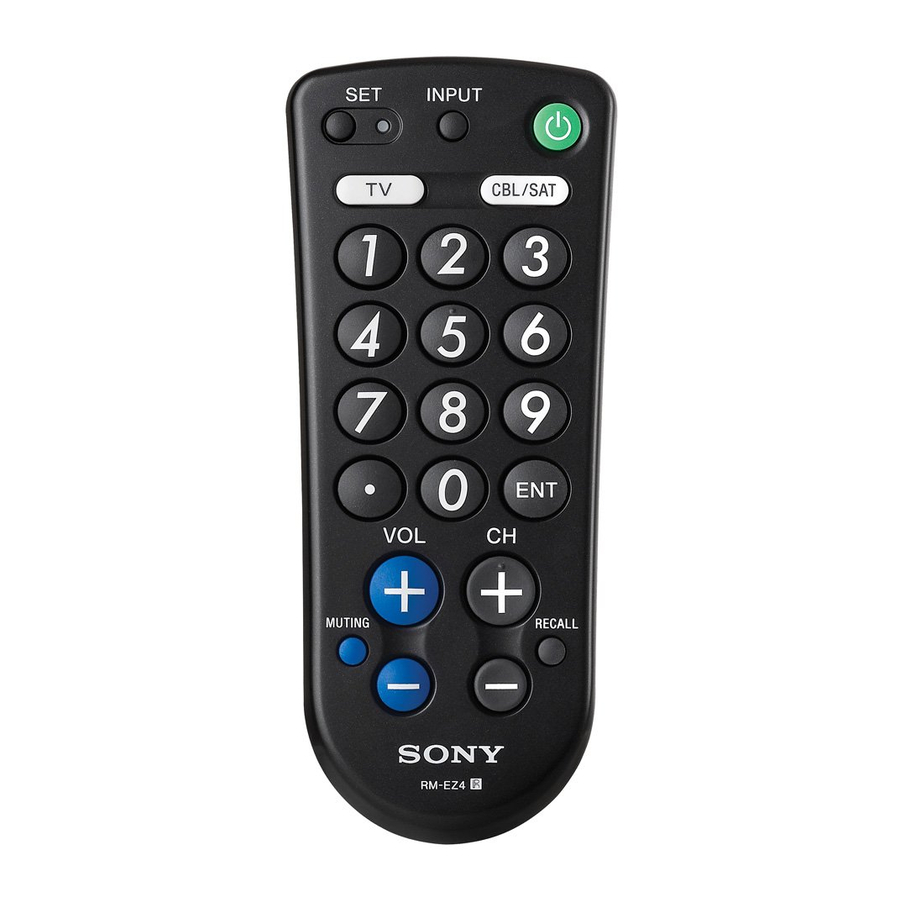
 To set up the Commander. (Para configurar el "Commander" (Controlador)).
 Volume up: + (Subir volumen: +)
Volume down: – (Bajar volumen: –)
 To mute the volume on a TV. (Para silenciar el volumen en un televisor).
 To turn the power of a selected component on or off. (Para encender o apagar la alimentación de un componente seleccionado).
 Component Select Buttons. Press to select a component to operate. (Botones de selección de componente. Presione para seleccionar un componente para operar).
About tactile dots (Acerca de los puntos táctiles)
The number 5 button and CH + each have a tactile dot for convenient use. (El botón número 5 y CH + tienen cada uno un punto táctil para un uso conveniente).
Note on the VOL +/– and MUTING buttons (Nota sobre los botones VOL +/– y SILENCIO)
The Commander controls or mutes the TV's volume when you select a visual component. The Commander outputs the signals to control or to mute the TV volume when you have set one of these components. (El "Commander" (Controlador) controla o silencia el volumen del televisor cuando selecciona un componente visual. El "Commander" (Controlador) emite las señales para controlar o silenciar el volumen del televisor cuando ha configurado uno de estos componentes).
Funcionamiento de un TV
 To change the input mode. (Para cambiar el modo de entrada).
 ,
,  and
and  To change the channel. (Para cambiar el canal).
 CH +: Channel up. (Canal arriba).
CH –: Channel down. (Canal abajo).
 To operate the JUMP, FLASHBACK or CHANNEL RETURN function on the TV. (Para operar la función JUMP (SALTO), FLASHBACK (RETROCESO) o CHANNEL RETURN (RETORNO DE CANAL) en el televisor).
Funcionamiento de un decodificador de cable
To change the input mode. (Para cambiar el modo de entrada).
, and To change the channel. (Para cambiar el canal).
CH +: Channel up. (Canal arriba).
CH –: Channel down. (Canal abajo).
To toggle the current/previous channel. (Para alternar el canal actual/anterior).
Notes (Notas)
- In some cases, you can turn the cable box on/off by pressing CH + or CH – on the Commander. (En algunos casos, puede encender/apagar el decodificador de cable presionando CH + o CH – en el "Commander" (Controlador)).
- If your cable box can control volume, be sure to set its volume control to a moderate level. If the volume on the cable box is turned down completely, you will not be able to adjust your TV's volume with the Commander. (Si su decodificador de cable puede controlar el volumen, asegúrese de configurar su control de volumen a un nivel moderado. Si el volumen del decodificador de cable está completamente bajado, no podrá ajustar el volumen de su televisor con el "Commander" (Controlador)).
Funcionamiento de un receptor de satélite digital
To switch the output of the digital satellite receiver to the TV. (When you connect a TV cable or antenna to the receiver, the output switches between TV and satellite programs.) (Para cambiar la salida del receptor de satélite digital al televisor. (Cuando conecta un cable de TV o una antena al receptor, la salida cambia entre programas de TV y satélite)).
, and To change the channel. (Para cambiar el canal).
CH +: Channel up. (Canal arriba). CH –: Channel down. (Canal abajo).
To tune to the last tuned station. (Para sintonizar la última estación sintonizada).
Especificaciones
| Operable distance (Distancia operable) | Approx. 7 m (23 ft) (varies depending on component manufacturer) (Aprox. 7 m (23 pies) (varía según el fabricante del componente)) |
| Power requirements (Requisitos de energía) | Two size AA (R6) batteries (not supplied) (Dos baterías tamaño AA (R6) (no incluidas)) |
| Battery life (Duración de la batería) | Approx. 1 year (varies depending on frequency of button use - up to approx. 300 times per day) (Aprox. 1 año (varía según la frecuencia de uso de los botones, hasta aprox. 300 veces al día)) |
| Dimensions (Dimensiones) | Approx. 63 × 149 × 30 mm (w/h/d) (2 1/2 × 5 7/8 × 1 3/16 in) |
| Mass (Masa) | Approx. 86 g (3.0 oz) (not including batteries) (Aprox. 86 g (3.0 oz) (sin incluir las baterías)) |
Design and specifications are subject to change without notice. (El diseño y las especificaciones están sujetos a cambios sin previo aviso).
Números de código de componente
Digital Satellite Receiver, Cable box, TV (Receptor de satélite digital, decodificador de cable, TV)
The following tables show brand names and their corresponding code numbers. (Las siguientes tablas muestran los nombres de las marcas y sus números de código correspondientes).

Press and hold the SET button for 2 seconds or more to set a Component Code. (Mantenga presionado el botón SET durante 2 segundos o más para configurar un código de componente).
Receptor de satélite digital

Decodificador de cable


TV


Descargar el manual
Aquí puede descargar la versión PDF completa del manual. Puede contener instrucciones de seguridad adicionales, información de garantía, reglas de la FCC, etc.
Descargar Sony RM-EZ4 - Manual del Remote Commander


