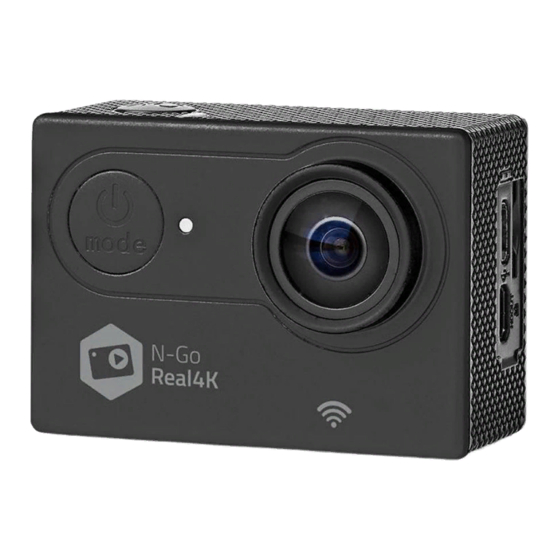
nedis ACAM61BK Guia De Inicio Rapido
Tabla de contenido
Idiomas disponibles
Idiomas disponibles
Enlaces rápidos
a
Quick start guide
Action camera
For more information see the extended manual online:
ned.is/acam61bk
Intended use
This product is intended as a recording device.
Any modification of the product may have consequences for safety, warranty and proper
functioning.
Parts list (Image A)
1 OK button
2 Wi-Fi indicator LED
3 Power button
4 Camera lens
5 UP button
Additional parts (not shown in illustration)
u Battery
i Waterproof housing
o Mounting accessories (x10) s 3M mats
Safety instructions
- WARNING
• Only use the product as described in this manual.
• Do not use the product if a part is damaged or defective. Replace a damaged or defective
device immediately.
• Do not drop the product and avoid bumping.
• This product may only be serviced by a qualified technician for maintenance to reduce
the risk of electric shock.
• Disconnect the product from the electrical outlet and other equipment if problems occur.
• Do not expose the product to water or moisture.
Insert or change memory card (Image B)
A microSD card (not included) is required to take pictures or videos. Insert the microSD card
into the microSD card slot t .
Use a microSD card with a maximum of 128 GB storage capacity.
4
Format the microSD card before use.
4
Battery (Image C)
Charge the camera from any USB outlet with the supplied micro USB cable. The camera can
be charged while recording video. Fully charging the battery takes about 3 hours.
When battery level is low, a low battery notification is shown on the screen and the
4
camera turns off.
Turn on camera
Hold the power button 3 for about 3 seconds until the status indicator LED q lights up
blue. A welcome screen appears, and the camera enters video mode.
Hold the power button 3 for about 3 seconds to turn off the camera. A goodbye screen
appears, and the display turns off.
Switching between modes
Switch between modes by pressing the power button 3 .
Attachment
Attach the action camera into the protective casing. The protective casing can be fitted with
supplied mounting accessory to your clothing, action gear, helmet, etc.
Record pictures and video images
In video mode, press OK to start or stop recording video.
In picture mode, press OK to take a picture.
View pictures and video images
In view mode, press UP or DOWN to go to the next or previous picture or video. Press OK to
play and stop videos.
Settings menu navigation
For a description of the settings menu, consult the extended manual online.
4
In the settings menu, use UP and DOWN to navigate between options. Press OK to select and
confirm options.
Transfer files to external device.
Connect the camera to your device with the micro USB cable. Transfer files you want to save
to your device.
Alternatively, take the microSD card from your camera and insert it into a card reader that is
connected to your device.
Use with N-go Real 4K App
Use the N-go Real 4K App on your mobile device to review images and videos, transfer them
to your mobile device, take pictures, record video, toggle picture and video modes and
change settings.
The app works best with iPhone or Android version 8.0 and up.
4
For more information about how the app works, consult the extended manual online.
4
1. Switch on your camera. Hold for 3 seconds to activate Wi-Fi.
2. Install and open the N-go Real 4K App. Select Wi-Fi network N-Go Real 4K. Enter password
12345678 to connect.
3. Once the connection is established, you see the live view of the camera. You can now
control the camera with the app.
4. When you are done, press UP on the camera to return to the video or picture mode.
View pictures and video images on external device
Ultra HD cable is not included.
4
To view the pictures and video images on a TV or monitor without transferring any files,
connect the camera with an ultra HD cable to the external device.
Specifications
Product
Article number
Dimensions (l x w x h)
Battery capacity
Memory
Camera lens
Image format
Image resolution
Video format
Video resolution
Time lapse
Display
Current
Charging time
Frequency bandwidth
Maximum transmission
power
Approximate recording time
The approximate recording time is an indication of how much video length can be saved on
the microSD card, depending on the video quality.
The maximum video length cannot be recorded on a single battery charge.
4
MicroSD card
16 GB
32 GB
64 GB
128 GB
Declaration of Conformity
We, Nedis B.V. declare as manufacturer that the product ACAM61BK from our brand Nedis
produced in China, has been tested according to all relevant CE standards and regulations
and that all tests have been passed successfully. This includes, but is not limited to the RED
2014/53/EU regulation.
The complete Declaration of Conformity (and the safety datasheet if applicable) can be
found and downloaded via webshop.nedis.com/ACAM61BK#support
For additional information regarding the compliance, contact the customer service:
Web: www.nedis.com
E-mail: service@nedis.com
Phone: +31 (0)73-5991055 (during office hours)
Nedis B.V., de Tweeling 28
5215 MC 's-Hertogenbosch, the Netherlands
6 DOWN button
7 Speaker
8 Display
9 Charging indicator LED
q Power indicator LED
p Bandages
a Micro USB cable
Picture mode
Video mode
Action camera
ACAM61BK
60 x 31 x 41 mm
900 mAh
MicroSD card (16 - 128) (not included)
Viewing angle = 170 degrees
.jpg
8 MP - 16 MP
.mp4
4K, 60 fps / 4K, 30 fps/ 2.7K, 30 fps / 1080FHD, 120 fps / 1080FHD, 60 fps /
1080FHD, 30 fps / 720p, 240 fps / 720p, 120 fps / 720p, 30 fps
Up to 30 seconds
2.0 LTPS
Standby: 410 mAh
Working: 610 mAh
3 hours
2.4 GHz
14 dBm
720p, 120 fps
95 minutes
180 minutes
340 minutes
640 minutes
1080p, 30 fps
140 minutes
270 minutes
520 minutes
1000 minutes
ACAM61BK
w Battery cover
e Microphone
r Micro USB port
t MicroSD card slot
y HDMI port
d Tethers
f Lens cloth
4K, 30 fps
90 minutes
170 minutes
320 minutes
600 minutes
,
®
Tabla de contenido

Manuales relacionados para nedis ACAM61BK


Resumen de contenidos para nedis ACAM61BK
-
Página 6: Especificaciones
640 minutos 1000 minutos 600 minutos Declaración de conformidad Nosotros, Nedis B.V., declaramos como fabricante que el producto ACAM61BK de nuestra marca Nedis , producido en China, ha sido probado de acuerdo con todas las normas y ® regulaciones relevantes de la CE y que se han superado todas las pruebas con éxito. Esto incluye, entre otras, la directiva europea sobre equipos radioeléctricos RED 2014/53/UE.