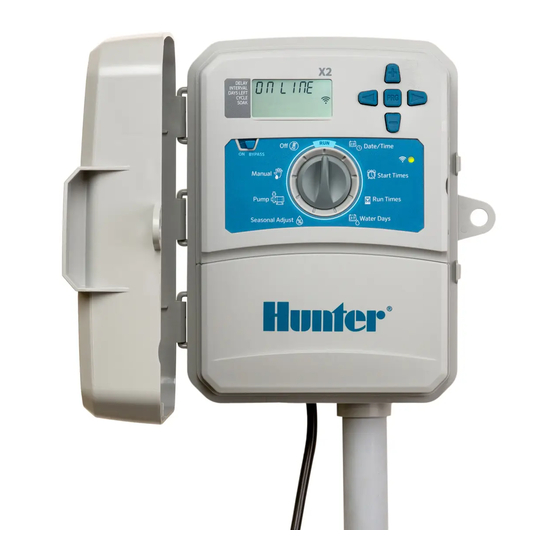
Hunter X2 Guía Rápida De Programación
Programador de riego
Ocultar thumbs
Ver también para X2:
- Guia de inicio rapido (41 páginas) ,
- Guía rápida de programación (29 páginas) ,
- Guía de comienzo rápido (8 páginas)
Tabla de contenido
Idiomas disponibles
Idiomas disponibles
Enlaces rápidos
X2
IRRIGATION CONTROLLER QUICK START PROGRAMMING GUIDE
™
Main Display
①
⑤
③
②
⓫
④
⑥
➐
X2 dial and button functions are disabled when Wi-Fi is on,
as well as the existing schedule and settings. All programming
is managed from the Hydrawise™ online software. Manual
Station, Manual Program, and Test All Stations can be
activated at the controller.
①
Program Indicator
②
Station Running
③
Sprinkler Off Days
④
Start Time Symbol
⑤
Run Time Symbol
⑥
Month Symbol
⑦
Day Symbol
The Bluetooth
word mark and logos are registered trademarks owned by Bluetooth SIG Inc.
®
and any use of such marks by Hunter Industries is under license.
⓮
⓭
⑩
⓬
Sensor Bypass Switch
Control Buttons
➑ ⑨
⑧
Rain Sensor Active/Override
⑨
Bluetooth
On
®
⑩
Wi-Fi On
⑪
Days of the Week
⑫
Odd/Even/Interval Days
⑬
Time Mode (AM/PM/24 HR)
⑭
Seasonal Adjust (%)
ADD
WI-FI
Dial Must Be in RUN Position for Automatic Irrigation
Setting Current Date and Time
1. Turn the dial to the DATE/TIME position.
2. The current year will be flashing. Use the + and - buttons to change
the year. Push the ► button to proceed to setting the month.
3. The month will be flashing. Use the + and - buttons to change
the month. Press the ► button to proceed to the day setting.
4. The day will be flashing. Use the + and – buttons to change the
day of the month. Press the ► button to proceed to the time setting.
5. The time will be displayed. Use the + and – buttons to select
AM, PM, or 24 HR to display all times in 24-hour mode.
6. Press the ► button to move to hours. Use the + and - buttons to
change the hour shown on the display.
7. Press the ► button to move on to minutes.
Use the + and - buttons to change the minutes shown in the display.
Turn the dial to the RUN position. Date and time are now set.
Setting Program Start Times
1. Turn the dial to the START TIMES position.
2. Press the PRG button to select A, B, or C.
3. Use the + and - buttons to change the start time. The start time
advances in 15-minute increments.
4. Press the ► button to add another start time, or PRG button to
set a start time for the next program.
Eliminating a Program Start Time
With the dial set to the START TIMES position, push the + and - buttons
until you reach 12:00 AM (midnight). From this position, push the - button
once to reach the "OFF" position.
https:/ /hunter.direct/WAND
Tabla de contenido
Solución de problemas

Manuales relacionados para Hunter X2


Resumen de contenidos para Hunter X2
- Página 4 - una vez para llegar a la posición “OFF” La marca nominativa y los logotipos de Bluetooth son marcas comerciales registradas propiedad ® de apagado. de Bluetooth SIG Inc. y cualquier uso de tales marcas por Hunter Industries es bajo licencia.
- Página 5 Configuración de los tiempos de riego de Bomba (P/MV) Programa de prueba las estaciones Hace funcionar todas las estaciones durante un Pulse ► para seleccionar las estaciones. Pulse + tiempo de prueba determinado. 1. Gire el dial hasta la posición Tiempos de riego. o –...
-
Página 6: Consejos De Programación
CONSEJOS DE PROGRAMACIÓN Un programa es un calendario de riego que incluye una o más horas de arranque, el/los tiempo(s) de riego y el/los día(s) de riego. La hora de arranque es la hora del día a la que las estaciones de un programa empiezan a regar. -
Página 7: Guía De Resolución De Problemas
Para más información sobre la resolución de problemas: https:/ /hunter.direct/X2help © 2019 Hunter Industries Inc. Hunter, el logotipo de Hunter y el resto de marcas comerciales son propiedad de Hunter Industries, registradas en los EE. UU. y otros países. | hunterindustries.com/es RC-103 - QG -ES 9/19... - Página 28 NOTES ___________________________________________________________________________________________________ ___________________________________________________________________________________________________ ___________________________________________________________________________________________________ ___________________________________________________________________________________________________ ___________________________________________________________________________________________________ ___________________________________________________________________________________________________ ___________________________________________________________________________________________________ ___________________________________________________________________________________________________ ___________________________________________________________________________________________________ ___________________________________________________________________________________________________ ___________________________________________________________________________________________________ ___________________________________________________________________________________________________ ___________________________________________________________________________________________________ ___________________________________________________________________________________________________ ___________________________________________________________________________________________________ ___________________________________________________________________________________________________ ___________________________________________________________________________________________________ ___________________________________________________________________________________________________ ___________________________________________________________________________________________________ ___________________________________________________________________________________________________ ___________________________________________________________________________________________________...