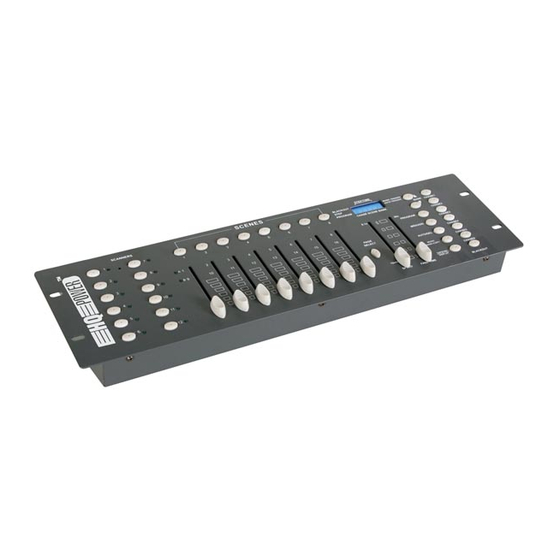
HQ-Power VDPDMXC145 Manual
Tabla de contenido
Idiomas disponibles
Idiomas disponibles
Enlaces rápidos
VDPDMXC145 – 192-CHANNEL DMX CONTROLLER
1. Introduction & Features
Thank you for buying the VDPDMXC145 ! Please read the manual carefully before bringing this
device into service.
This is a 192-channel DMX controller, capable of controlling 12 devices with up to 16 channels.
The device features 30 banks of 8 scenes each, 6 chases for scene programming and a 4-digit
LED display.
Check carefully for damage caused by transportation. Consult your dealer and don't install this
device if it has been damaged in transit.
2. Safety Instructions
Be very careful during the installation : touching live
wires can cause life-threatening electroshocks.
Keep this device away from rain and moisture
Unplug the mains lead before opening the housing
• A qualified technician should install and service this device.
• Damage caused by disregarding certain guidelines in this manual is not covered by the
warranty and the dealer will not accept responsibility for the ensuing defects or problems.
• Do not switch the device on immediately if it has been exposed to changes in temperature.
Protect the device against damage by leaving it switched off until it has reached room
temperature.
• Make sure that the available voltage does not exceed the voltage stated in the specifications
of this manual.
• Do not crimp the power cord and protect it against damage from sharp edges. Ask an
authorised dealer to replace the cord if necessary.
• Always disconnect the device from the mains when it is not in use or when you wish to clean
it. Only handle the power cord by the plug. Never pull out the plug by tugging the power cord.
• Note that damage caused by user modifications to the device are not covered by the
warranty. Keep the device away from children and unauthorised users.
3. General Guidelines
• This device is a lighting controller for professional use on stage, in discos, theatres, etc. The
VDPDMXC145 should only be used indoors with the included adapter working on an
alternating current of max. 230Vac/50Hz.
VDPDMXC145
1
VELLEMAN
Tabla de contenido

Manuales relacionados para HQ-Power VDPDMXC145


Resumen de contenidos para HQ-Power VDPDMXC145
- Página 25 ¡Gracias por haber comprado el VDPDMXC145! Lea cuidadosamente las instrucciones del manual antes de montarlo. El VDPDMXC145 es un controlador DMX de 192 canales, apto de controlar 12 aparatos de 16 canales cada uno. El aparato está provisto de 30 BANKS (bancos de memoria) de 8 escenas cada uno, 6 chase para la programación de escenas y una pantalla LED de 4 dígitos.
- Página 26 • No quite el código de barras de serie del aparato. En caso de que esto ocurra la garantía ya no es válida. Sólo use el VDPDMXC145 para aplicaciones descritas en este manual a fin de evitar p.ej. cortocircuitos, quemaduras, descargas eléctricas, explosión de la lámpara, etc.
- Página 27 (01 – 30) se componen del tercer y cuarto dígito de la pantalla LED. 9. Chase (1 – 6) Apriete uno de estos botones para almacenar o reproducir un chase. El primer dígito en la pantalla es el número del chase (1 – 6). VDPDMXC145 VELLEMAN...
- Página 28 Vuelva a apretar este botón para desactivar el modo blackout. Fig. 2 b) Panel posterior 16. MIDI IN 17. DMX POLARITY SELECT 18. DMX OUT (XLR de 3 polos) 19. Entrada CC (9-12V, 300mA) VDPDMXC145 VELLEMAN...
-
Página 29: Programar Escenas
3. Seleccione un banco con ▲ o ▼ y apriete el botón de la escena hacia la cual quiere copiar los ajustes de la primera escena. e) Borrar una escena 1. Seleccione la escena en cuestión apretando el botón correspondiente. 2. Mantenga apretado el botón AUTO/DEL mientras que apriete el botón de la escena que quiere borrar. VDPDMXC145 VELLEMAN... -
Página 30: Programar Un Chase
4. Seleccione una escena de un banco usando ▲ o ▼ y apriete el botón SCENE correcto. 5. Apriete MIDI/REC para introducir la nueva escena en el paso recién creado. El previo paso 10 se vuelve el nuevo paso 11, etc. VDPDMXC145 VELLEMAN... -
Página 31: Reproducir Escenas
3. Vuelva a apretar MUSIC/BANKCOPY para salir del modo MUSIC RUN. d) Modo Midi Run Las escenas de un banco se seleccionan mediante la entrada MIDI cuando el aparato se encuentra en el modo MANUAL RUN, AUTO RUN o MUSIC RUN. VDPDMXC145 VELLEMAN... - Página 32 Activa/desactiva SCENE 3 Activa/desactiva SCENE 4 BANCO 15 Activa/desactiva SCENE 5 Activa/desactiva SCENE 6 Activa/desactiva SCENE 7 Activa/desactiva SCENE 8 Activa/desactiva SCENE 1 Activa/desactiva SCENE 2 Activa/desactiva SCENE 3 CHASE Activa/desactiva SCENE 4 Activa/desactiva SCENE 5 Activa/desactiva SCENE 6 BLACKOUT VDPDMXC145 VELLEMAN...