Velleman MML16C Manual De Instrucciones
Tabla de contenido
Idiomas disponibles
Idiomas disponibles
Enlaces rápidos
MML16C – MULTICOLOURED MESSAGE BOARD
1. Introduction & Features
Thank you for buying the MML16C! It features eight colours (a total of 16 colour combinations when using coloured
backgrounds) and the ability to store up to 100 messages. Other features include:
• 30 graphic symbols such as phone, car, sunglasses, etc. to shorten messages
• 24 methods of displaying a message (scroll up from bottom to top, opened from centre, explode, etc.)
• 8 display speeds
• 3 different beep sounds can be added anywhere in the message
• the ability to display multiple messages in a defined sequence and to include the current date and time
A mounting bracket is included to enable ceiling or wall mounting.
Please read the manual thoroughly before bringing this device into service. If the device was damaged in transit,
don't install or use it and contact your dealer.
2. Safety Instructions
• Mount the MML16C close to an electrical outlet and make sure the adapter matches the mains voltage.
• Unplug the mains lead before cleaning. Do not use liquid or aerosol cleaners ; use a damp cloth.
• Take the device to a qualified technician when the device and/or the power cord look(s) damaged.
• The MML16C is to only be used indoors. Keep it away from direct sunlight, excessive heat, moisture and dust.
• The warranty does not cover damage as a result from improper maintenance, unauthorised modification and misuse.
• Do not put heavy objects on your MML16C or spill liquids on it.
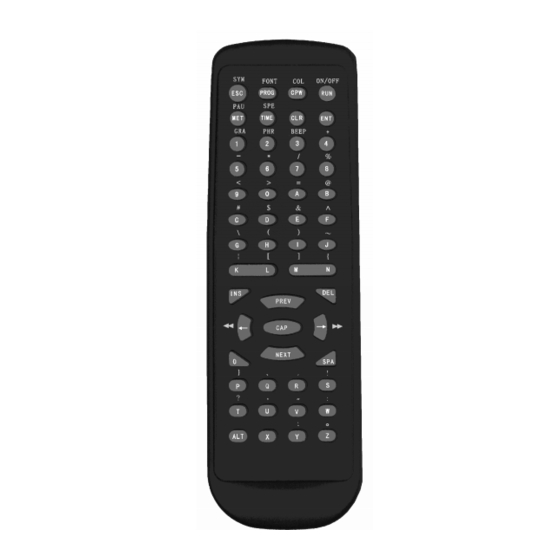
3. Remote Control
The remote control allows you to program messages into the unit. It eliminates unnecessary wiring
and enables you to edit messages from a distance. Aim the remote control straight at the MML16C
in order to ensure that it receives your commands. The device emits an audible beep each time it
receives a signal to confirm reception.
Refer to the figure at the right to view the remote control layout. The keys at the top are function
keys (i.e. for colour change or letter style change). Due to the limited space on the MML16C, the
control signal may not be shown in its exact wording.
4. Programming Functions
INS Insert a command or character.
PREV Select the previous option.
DEL Delete the command or character at the right of the screen.
← Move to the left.
CAP Toggle between upper and lower case.
→ Move to the right.
NEXT Select the next option.
SPA Insert a space in the message.
ALT (at the bottom left) To be used with another key to obtain what is printed above that
MML16C
- 1 -
key.
VELLEMAN
Tabla de contenido

Manuales relacionados para Velleman MML16C


Resumen de contenidos para Velleman MML16C
-
Página 31: Mml16C - Mensaje Rodante Multicolor
2. Instrucciones de seguridad • Monte el MML16C cerca de una toma de corriente y verifique que el adaptador coincide con la tensión de red. • Desconecte el aparato de la red antes de limpiarlo. No utilice detergentes, líquidos o aerosoles ; utilice un paño húmedo. - Página 32 [PAUSE 2] pausa de 3 segundos [PAUSE 6] pausa de 20 segundos [PAUSE 3] pausa de 4 segundos [PAUSE 7] pausa de 30 segundos [PAUSE 4] pausa de 6 segundos [PAUSE 8] pausa de 60 segundos - 32 - VELLEMAN MML16C...
- Página 33 BEEP (ALT+3) Añadir una señal sonora en un mensaje. (3 posibilidades: [BEEP 1], [BEEP 2], [BEEP 3]) 5. Protección por contraseña El MML16C está equipado con una protección por contraseña. Para poder programar un mensaje, introduzca la contraseña correcta. La contraseña estándar es "000". Si el aparato pregunta la contraseña, introduzca "000"...
- Página 34 Si perdiera u olvidara la contraseña por cualquier motivo, desatornille los 4 pequeños tornillos de las esquinas del MML16C, quite las placas laterales y saque el CI de la caja. En la parte trasera del CI, hay un bloque rojo con 8 conmutadores DIP.
- Página 35 Después de haber programado su primer mensaje con éxito, verá que el mando a distancia es un aparato muy práctico para programar el MML16C. El aparato puede visualizar 16 combinaciones diferentes de colores y contiene diferentes métodos de visualización, lo que le permite crear mensajes extremadamente complejos. No hay un método o un color específico con el que deba empezar un mensaje –...
-
Página 36: Utilizar Caracteres Internacionales
Si determina modificar el plato del día pero no la bebida del día, basta con modificar el mensaje número 12. No olvide que el MML16C siempre visualizará los ficheros secuenciales (S0→S9) si está conectado a la red, si se ha(n) introducido (un) fichero(s) secuencial(es) y si se ha ajustado la hora. -
Página 37: Temporizador
CAP dos veces en el mismo lugar. 12. Temporizador El MML16C le ofrece la posibilidad de programarlo para activarse y desactivarse en momentos determinados durante el día. Tenga en cuenta que sólo puede modificar el temporizador en el modo de programación. -
Página 38: Programación Por Software
Primero, guarde el software incluido en el disco duro mismo (no en un fichero del disco duro). Inicie el programa, la siguiente pantalla aparecerá: Bajo "Color", seleccione "Double color" El MML16C es 80 píxeles de largo. La selección bajo 'Send option' no es importante. Haga clic en 'OK', la pantalla principal aparecerá: Seleccione el tipo y el color de letra e introduzca su mensaje en el campo de modificación (la parte negra grande). - Página 39 Seleccione “Send edit area’s content”. La siguiente pantalla se visualizará: La dirección del MML16C siempre es "1" ; seleccione el puerto COM aplicable y haga clic en 'OK'. Si selecciona “send disk file…”, el programa le pedirá de abrir un fichero existente (*.SDV). Luego, la misma ventana de diálogo aparecerá.
-
Página 40: Solución De Problemas
• Auto Off: hora de parada del MML16C. • Set time: visualización de la hora en 12/24h. Moving sign option: seleccionar el número de aparatos conectados (no es importante para el MML16C). 14. Solución de problemas La pantalla está vacía - Verifique que el adaptador está...