Astralpool VICTORIA PLUS SILENT VS Manual De Instrucciones
Ocultar thumbs
Ver también para VICTORIA PLUS SILENT VS:
- Manual de instrucciones (37 páginas) ,
- Manual de instrucciones (77 páginas)
Tabla de contenido
Idiomas disponibles
Idiomas disponibles
Enlaces rápidos
VICTORIA PLUS SILENT VS CONTROL PANEL MANUAL
MANUEL PANNEAU DE COMMANDE VICTORIA PLUS SILENT VS
MANUAL PANEL DE CONTROL VICTORIA PLUS SILENT VS
MANUALE PANNELLO DI CONTROLLO VICTORIA PLUS SILENT VS
HANDBUCH BEDIENFELD VICTORIA PLUS SILENT VS
MANUAL DO PAINEL DE CONTROLO DA VICTORIA PLUS SILENT VS
V I C T O R I A P L U S S I L E N T V S
Tabla de contenido

Manuales relacionados para Astralpool VICTORIA PLUS SILENT VS


Resumen de contenidos para Astralpool VICTORIA PLUS SILENT VS
- Página 1 MANUALE PANNELLO DI CONTROLLO VICTORIA PLUS SILENT VS HANDBUCH BEDIENFELD VICTORIA PLUS SILENT VS MANUAL DO PAINEL DE CONTROLO DA VICTORIA PLUS SILENT VS V I C T O R I A P L U S S I L E N T V S...
- Página 55 PANNEAU DE CONTRÔLE HMI VICTORIA PLUS SILENT VS - MANUEL D'INSTRUCTIONS...
- Página 56 7. DIAGRAMME BRANCHEMENT INVERTER PANNEAU DE CONTRÔLE HMI VICTORIA PLUS SILENT VS - MANUEL D'INSTRUCTIONS...
-
Página 59: Panel De Control
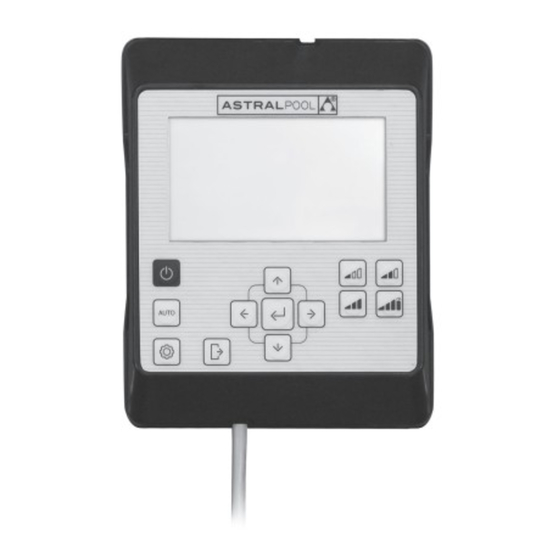
PANEL DE CONTROL Funcionamiento Pre-establecido: Velocidad Baja Encendido/ Apagado Velocidad Media Velocidad Alta Auto Velocidad Turbo Ajustes Salir Introducir Botones de flechas: Flecha Arriba Flecha Izquierda Flecha Abajo Flecha Derecha PANEL DE CONTROL HMI VICTORIA PLUS SILENT VS - MANUAL DE INSTRUCCIONES... -
Página 60: Uso Del Panel De Control
USO DEL PANEL DE CONTROL La bomba de velocidad variable Victoria Plus Silent VS dispone de un panel de control para iniciar y detener la bomba y para ajustar y visualizar los parámetros y configuraciones de la bomba. CONTROLES DEL TECLADO: Encendido/Apagdo: Pulse el botón para iniciar o detener la bomba. -
Página 61: Puesta En Marcha De La Bomba
MODO REPOSO ® ® AUTO Pantalla Botón 1 10 11 MODO AUTO 13 14 15 16 17 18 19 20 21 22 23 24 Encendido/Apagado PANEL DE CONTROL HMI VICTORIA PLUS SILENT VS - MANUAL DE INSTRUCCIONES... -
Página 62: Modos De Funcionamiento De La Bomba
PANTALLA MODO MANUAL: ® Modo de funcionamiento: Unidades de funcionamiento Modo MANUAL activo MANUAL Icono Velocidad Pre-establecida (Sólo aparece si está activo) Velocidad de funcionamiento Día de la semana PANEL DE CONTROL HMI VICTORIA PLUS SILENT VS - MANUAL DE INSTRUCCIONES... -
Página 63: Modo De Funcionamiento Manual Con Velocidad Pre-Establecida
Flecha de Abajo para disminuir el valor. Mediante pulsación corta se obtienen incrementos de 25 RPM y mediante pulsación prolongada (>3s) los incrementos de 25 RPM se producen de manera continuada hasta dejar de pulsar el botón. PANEL DE CONTROL HMI VICTORIA PLUS SILENT VS - MANUAL DE INSTRUCCIONES... -
Página 64: Ejemplo Variación De La Velocidad Media Pre-Establecida En Modo Manual
USE LA SIGUIENTE SECUENCIA PARA EL AJUSTE DE LA VELOCIDAD EN MODO MANUAL: MODO REPOSO MODO AUTO MODO MANUAL Parpadeo valor RPM durante la fase de cebado Subir velocidad del arranque (si aplica). Hasta máx: Hasta mín: Bajar velocidad PANEL DE CONTROL HMI VICTORIA PLUS SILENT VS - MANUAL DE INSTRUCCIONES... -
Página 65: Activación Del Modo Auto
Ajustes (Sección 2.3.5). ACTIVACIÓN DEL MODO AUTO: Modo de funcionamiento: Modo AUTO activo MODO REPOSO ® Modos de Auto Funcionamiento Pre-establecido Franjas horarias (24 h) Día de la semana actual PANEL DE CONTROL HMI VICTORIA PLUS SILENT VS - MANUAL DE INSTRUCCIONES... -
Página 66: Menú Ajustes
CLOCK SETTINGS SETTINGS Entrar a la configuración del ajuste Desplazamiento barra menú de Ajustes Menú de Ajustes (SETTINGS) Pulsar las veces necesarias para retroceder hasta el nivel deseado PANEL DE CONTROL HMI VICTORIA PLUS SILENT VS - MANUAL DE INSTRUCCIONES... -
Página 67: Menú De Ajustes
SINGLE SPEED: Tiempo de funcionamiento diario de la bomba en horas €/kWh—$/kWh: Coste del kWh, en Euros o Dólares TIMER Visualización y configuración de la Programación AUTO. 2.3.8 Configuración avanzada. EXPERT 2.3.9 PANEL DE CONTROL HMI VICTORIA PLUS SILENT VS - MANUAL DE INSTRUCCIONES... - Página 68 CLOCK DAY UNITS SETPOINT SET SAVING VIEW TIMER EXPERT SETTINGS Desplazamiento de dígito CLOCK SETTINGS Aumentar o disminuir valor del dígito Regresar sin realizar cambios Confirmar Regreso al Menú de Ajustes PANEL DE CONTROL HMI VICTORIA PLUS SILENT VS - MANUAL DE INSTRUCCIONES...
- Página 69 CLOCK DAY UNITS SETPOINT SET SAVING VIEW TIMER EXPERT SETTINGS SETTINGS Cambia el día de la semana seleccionado Regresar sin realizar cambios Confirmar Regreso al Menú de Ajustes PANEL DE CONTROL HMI VICTORIA PLUS SILENT VS - MANUAL DE INSTRUCCIONES...
- Página 70 Parámetro de visualización configurado CLOCK DAY UNITS SETPOINT SET SAVING VIEW TIMER EXPERT SETTINGS UNITS SETTINGS Cambia el parámetro de visualización Regresar sin realizar cambios Confirmar Regreso al Menú de Ajustes PANEL DE CONTROL HMI VICTORIA PLUS SILENT VS - MANUAL DE INSTRUCCIONES...
- Página 71 CLOCK DAY UNITS SETPOINT SET SAVING VIEW TIMER EXPERT SETTINGS UNITS SETPOINT SETTINGS Cambia la unidad del punto de consigna Regresar sin realizar cambios Confirmar Regreso al Menú de Ajustes PANEL DE CONTROL HMI VICTORIA PLUS SILENT VS - MANUAL DE INSTRUCCIONES...
- Página 72 CLOCK DAY UNITS SETPOINT SET SAVING VIEW TIMER EXPERT SETPOINT SETTINGS SETTINGS Aumentar o disminuir el valor de funcionamiento pre-establecido Regresar sin realizar cambios Confirmar Regreso al Menú de Ajustes Ver página siguiente PANEL DE CONTROL HMI VICTORIA PLUS SILENT VS - MANUAL DE INSTRUCCIONES...
- Página 73 Aumentar o disminuir el valor de funcionamiento pre-establecido CLOCK DAY UNITS SETPOINT SET SAVING VIEW TIMER EXPERT Regresar sin realizar cambios Confirmar SETTINGS Regreso al Menú de Ajustes PANEL DE CONTROL HMI VICTORIA PLUS SILENT VS - MANUAL DE INSTRUCCIONES...
- Página 74 CLOCK DAY UNITS SETPOINT SET SAVING VIEW TIMER EXPERT SAVING VIEW €/WEEK: €/WEEK: SETTINGS SETTINGS Cambia la unidad del ahorro energético Regresar sin realizar cambios Confirmar Regreso al Menú de Ajustes PANEL DE CONTROL HMI VICTORIA PLUS SILENT VS - MANUAL DE INSTRUCCIONES...
- Página 75 SET SAVING h/DAY SINGLE SPEED SETTINGS SETTINGS Desplazamiento de dígito Regresar sin realizar cambios Confirmar Aumentar o disminuir valor del dígito Regreso al Menú de Ajustes Ver página siguiente PANEL DE CONTROL HMI VICTORIA PLUS SILENT VS - MANUAL DE INSTRUCCIONES...
- Página 76 TUE: Programación AUTO para el día de la semana MARTES • WED: ProgramaciónAUTO para el día de la semana MIÉRCOLES • THUR: Programación AUTO para el día de la semana JUEVES PANEL DE CONTROL HMI VICTORIA PLUS SILENT VS - MANUAL DE INSTRUCCIONES...
-
Página 77: Opciones Disponibles En La Configuración De La Selección De La Franja Horaria Del Modo Auto
Introducir sólo cuando haya finalizado completamente la programación de la selección diaria. Los valores de Funcionamiento Pre-establecido Bajo, Medio y Alto pueden configurase desde la opción SETPOINT del Menú de Ajustes (Sección 2.3.5). PANEL DE CONTROL HMI VICTORIA PLUS SILENT VS - MANUAL DE INSTRUCCIONES... - Página 78 MON TUE WED THUR FRI SAT SUN Confirmar cuando haya configurado Regresar sin realizar cambios Confirmar completamente la programación de Regreso al Menú de Ajustes la selección diaria. PANEL DE CONTROL HMI VICTORIA PLUS SILENT VS - MANUAL DE INSTRUCCIONES...
-
Página 79: Opciones Del Menú De Ajustes Avanzados
1.0.9 Ajuste del tiempo de cebado en segundos: Mínimo 0 segundos hasta Máximo: 300 segundos Tiempo de Cebado 0 segundos: No se realiza la operación de Cebado específica PANEL DE CONTROL HMI VICTORIA PLUS SILENT VS - MANUAL DE INSTRUCCIONES... -
Página 80: Configura Los Parámetros De Conectividad
W005: No se consigue el SETPOINT Configura los parámetros de Conectividad CONNE ID _ Address: H0x0015 (Valor por defecto) COM _ Setup: H0x0100 (Valor por defecto) Watchdog _ Time: H0x1000 (Valor por defecto) PANEL DE CONTROL HMI VICTORIA PLUS SILENT VS - MANUAL DE INSTRUCCIONES... -
Página 81: Bloqueo Del Panel De Control
Desbloqueo Panel de Control MODO MANUAL Icono Panel de Control Bloqueado Pulsación > 3 seg. Pulsación > 3 segundos MANUAL Bloqueo Panel de Control en Modo Manual Desbloqueo Panel de Control PANEL DE CONTROL HMI VICTORIA PLUS SILENT VS - MANUAL DE INSTRUCCIONES... -
Página 82: Prioridades De Conectividad
Para visualizar los Avisos y las Alarmas, entre en la opción EXPERT del Menú de Ajustes (Sección 2.3.9). 6. MONTAJE DEL PANEL DE CONTROL EN PARED La bomba de velocidad variable Victoria Plus Silent VS dispone de un Panel de Control extraíble y preparado para ser montado en pared. - Página 83 PANEL DE CONTROL HMI VICTORIA PLUS SILENT VS - MANUAL DE INSTRUCCIONES...
-
Página 84: Diagrama Conexionado Inverter
7. DIAGRAMA CONEXIONADO INVERTER PANEL DE CONTROL HMI VICTORIA PLUS SILENT VS - MANUAL DE INSTRUCCIONES... -
Página 85: Entradas Digitales
Local Velocidad alta Local Paro de la bomba Local K4 Relé contacto seco. Indicación de funcionamiento de la bomba. COM/NC Indica posición funcionamiento. COM/NO Indica posición de paro. PANEL DE CONTROL HMI VICTORIA PLUS SILENT VS - MANUAL DE INSTRUCCIONES... - Página 172 Cod. 67547-0009/ Rev. 01 - We reserve the right to change all or part of the features of the articles or contents of this document, without prior notice. - Nous nous réservons le droit de modifier totalement ou en partiellement les caracteristiques de nos articles ou le contenu de ce document sans préavis. - Nos reservamos el derecho de cambiar total o parcialmente las características de nuestros artículos o contenido de este documento sin previo aviso.