Daikin Siesta ARCWB Manual De Instrucciones
Tabla de contenido
Idiomas disponibles
Idiomas disponibles
Enlaces rápidos
OPERATING
MANUAL
MON
TUE WED THU
AUTO
12
OVERRIDE
O N
12
12
O F F
ROOM
DRY
AUTO COOL
HEAT
FAN
TEMP.
SET
TEMP.
TURBO QUIET
SWING
SLEEP
MODE
TURBO
SWING
DELAY
TIMER
TIMER
ON
OFF
TIMER
FAN
FRI SAT SUN ALL
M
P M
F
C
QUIET
SLEEP
ON / OFF
Bedienungsanleitung
Drahtloses Handgerät
Bedieningsaanwijzing
Draadloos handapparaat
Manual De Instrucciones
Auricular Inalámbrico
Руководство По Зксплуатации
Беспроводное Дистанционное Управление
Ασύρματη Χειροσυσκευή
Manual De Funcionamento
Operating Manual
English
Handset Wireless
Mode D'emploi
Français
Combiné sans fi l
Deutsch
Nederlands
Español
Pycckий
Kullanım Kılavuzu
Türkçe
Kablosuz Kulaklık
Εγχειρίδιο Οδηγιών
Ελληνικά
Português
Aparelho Sem Fios
OM-SLM9-0312(0)-SIESTA
Part No.: R08019037545
Tabla de contenido

Manuales relacionados para Daikin Siesta ARCWB


Resumen de contenidos para Daikin Siesta ARCWB
- Página 1 OPERATING MANUAL Operating Manual English Handset Wireless TUE WED THU FRI SAT SUN ALL AUTO OVERRIDE O F F Mode D’emploi ROOM AUTO COOL HEAT TEMP. Français TEMP. TURBO QUIET SWING SLEEP Combiné sans fi l Bedienungsanleitung MODE TURBO SWING QUIET Deutsch Drahtloses Handgerät...
- Página 3 Battery Type: AAA.R03 Quantity: 2 pieces Disposal Requirements The batteries supplied with the controller are marked with this symbol. This means that the batteries shall not be mixed with unsorted household waste. If a chemical symbol is printed beneath the symbol, this chemical symbol means that the battery contains a heavy metal above a certain concentration.
- Página 11 MEMO...
- Página 19 LE MÉMO...
- Página 27 MITTEILUNG...
- Página 35 MEMO...
-
Página 36: Arcwb Indicación Del Regulador
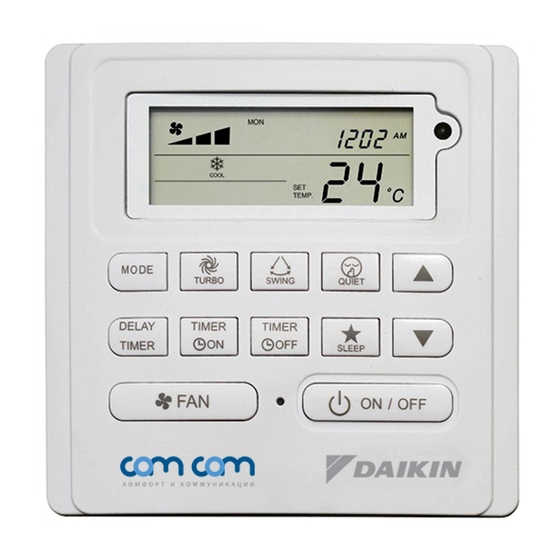
ARCWB Indicación Del Regulador TUE WED THU FRI SAT SUN ALL AUTO OVERRIDE O F F ROOM AUTO COOL HEAT TEMP. TEMP. TURBO QUIET SWING SLEEP MODE TURBO SWING QUIET DELAY TIMER TIMER TIMER SLEEP ON / OFF TECLA FUNCIÓN MODE Selecciona el control de Modos de funcionamiento (Cool (Frio) / Heat (Calor) / Auto / Dry (seco) /Fan (ventilacion)) - Página 37 INSTRUCCIONES DE OPERACIÓN Botón MODE Pulse el botón MODE para cambiar la operación de COOL (FRIO), HEAT* (CALOR), AUTO*, DRY* (SECO), FAN (VENTILACIÓN). Compruebe el indicador para ver en que modo el control está ajustado. *HEAT (CALOR), AUTO y DRY (SECO) están disponibles solo para los modelos seleccionados. Velocidad de ventilador TURBO Pulse la tecla TURBO una vez para activar la velocidad de ventilación Turbo.
- Página 38 Tabla 1,1 : Presión de tecla Timer ON y Timer OFF y secuencia de evento. TECLA TIMER ON TECLA TIMER OFF ON Temporizador 1 ON Temporizador 2 OFF Temporizador 1 OFF Temporizador 2 Desactivado Desactivado Desactivado Desactivado Activado Desactivado Activado Desactivado Desactivado Activado...
-
Página 39: Función Delay Timer
Función DELAY TIMER Presione la tecla DELAY TIMER una vez y se activará la función de temporizador de retardo durante 1 hora. Se mostrará un indicador “OVERRIDE” en el LCD. Pulse la misma tecla de nuevo y la selección aumentará a 2 horas. Se mostrará un indicador “OVERRIDE” . Si vuelve a pulsar se desactivará la función de temporizador de retardo. -
Página 40: Reserva De Batería
1.14 Reserva de batería La reserva de batería se utiliza para retener los valores del RTC y los ajustes del temporizador programable de siete días durante cortes de alimentación eléctrica durante un mínimo de 1 mes seguido para cada nuevo conjunto de pilas instaladas. - Página 41 CÓDIGO DE SIGNIFICADO ERROR ERROR DE PCB EXTERIOR PROTECCIÓN DE ALTA PRESIÓN PROTECCIÓN DE BAJA PRESIÓN BLOQUEO DEL MOTOR DEL COMPRESOR/COMPRESOR SOBRECARGADO ERROR DE ARRANQUE DEL COMPRESOR MOTOR VENTILADOR CC EXTERIOR TRABADO SOBRECORRIENTE EN ENTRADA DE CA ERROR EXV ERROR EN VÁLVULA DE 4 VÍAS SOBRECALENTAMIENTO TUBERÍA DE DESCARGA SOBRECALENTAMIENTO DEL INTERCAMBIADOR DE CALOR ERROR DEL SISTEMA DEL SENSOR DEL COMPRESOR...
-
Página 42: Ajuste De Hardware
AJUSTE DE HARDWARE La unidad tiene 2 puentes para controlar la función de la placa. Tabla 2,0 : Resumen de ajustes de hardware OPCIÓN Con puente Sin puente Establecer rango de temperatura de Establecer rango Establecer rango de temperatura de 16°C –... - Página 43 EL MEMORÁNDUM...
- Página 51 ПАMЯTKA...
- Página 67 ΣΗΜΕΙΩΣΕΙΣ...
- Página 75 MEMO...
- Página 76 • In the event that there is any confl ict in the interpretation of this manual and any translation of the same in any language, the English version of this manual shall prevail. • The manufacturer reserves the right to revise any of the specifi cation and design contain herein at any time without prior notifi...