Samsung SolarCell Remote - Guía rápida del control remoto
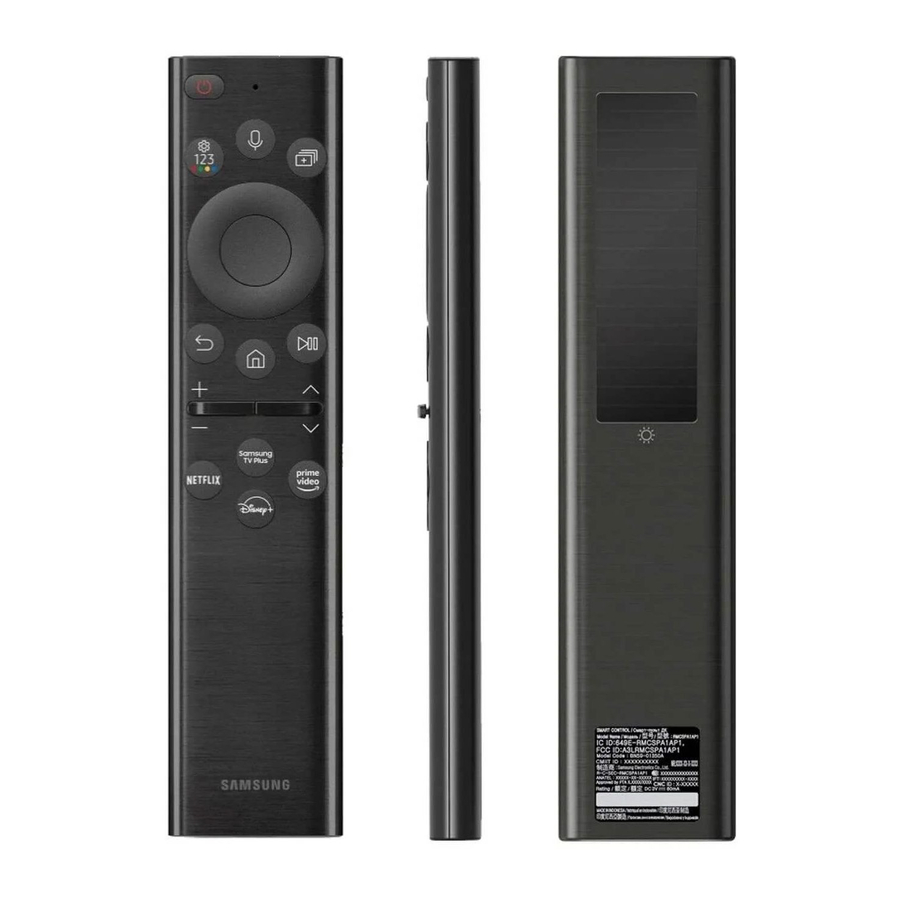
Acerca del dispositivo
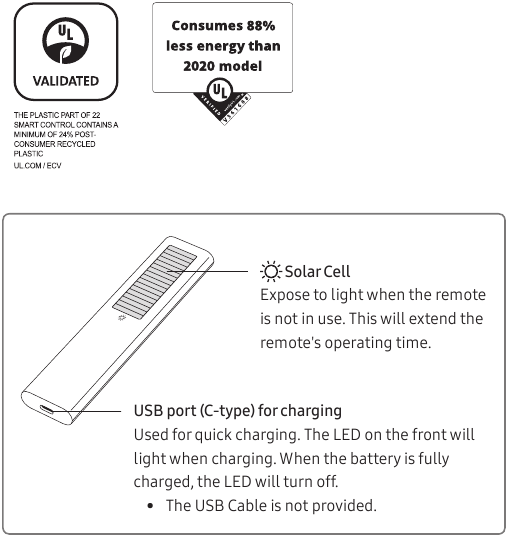
Solar Cell (Celda Solar)
Exponga a la luz cuando el control remoto no esté en uso. Esto extenderá el tiempo de funcionamiento del control remoto.
USB port (C-type) for charging (Puerto USB (tipo C) para cargar)
Se utiliza para una carga rápida. El LED en la parte delantera se iluminará durante la carga. Cuando la batería esté completamente cargada, el LED se apagará.
- The USB Cable is not provided. (El cable USB no está incluido).
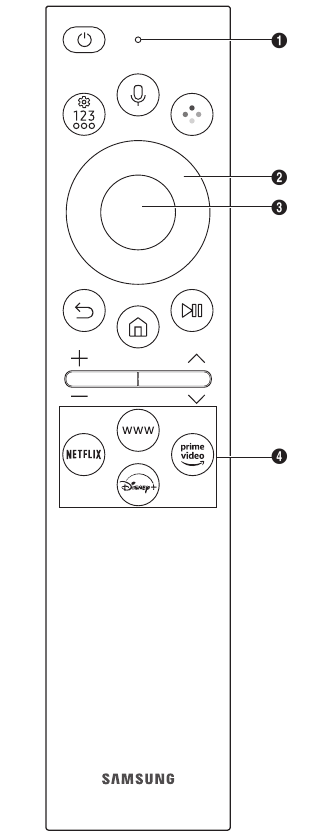
| Button (Botón) | Description (Descripción) |
 (Power (Encendido)) (Power (Encendido)) | Press to turn the TV on or off. (Presione para encender o apagar el televisor). For The Frame model, When watching TV, press to switch to Art mode. (Para el modelo The Frame, cuando vea la televisión, presione para cambiar al modo Art). In Art mode, press to switch to the Media Home. (En el modo Art, presione para cambiar a Media Home). Press and hold to turn off the TV completely. (Mantenga pulsado para apagar el televisor por completo). |
 MIC / LED MIC / LED | Used as MIC when using voice recognition with the remote control. (Se utiliza como MIC cuando se usa el reconocimiento de voz con el control remoto).
|
 (Voice Assistant (Asistente de voz)) (Voice Assistant (Asistente de voz)) | Runs Voice Assistant. (Ejecuta el Asistente de voz). Press and hold the button, say a command, and then release the button to run Voice Assistant. (Mantenga pulsado el botón, diga un comando y, a continuación, suelte el botón para ejecutar el Asistente de voz).
|
 (Settings / Number / Option button (Botón de configuración/número/opción)) (Settings / Number / Option button (Botón de configuración/número/opción)) | Each time you press this button, Settings menu / virtual numeric pad / Option pad are displayed alternately. (Cada vez que pulse este botón, se mostrarán alternativamente el menú de configuración/el teclado numérico virtual/el panel de opciones).
|
 (Colour button (Botón de color)) (Colour button (Botón de color)) | When pressed, coloured buttons appear on the screen. (Cuando se pulsa, aparecen botones de colores en la pantalla). Use this button to access additional options that are specific to the feature in use. (Utilice este botón para acceder a opciones adicionales que son específicas de la función en uso). |
 Directional button (Botón direccional) (up (arriba), down (abajo), left (izquierda), right (derecha)) Directional button (Botón direccional) (up (arriba), down (abajo), left (izquierda), right (derecha)) | Moves the focus and changes the values seen on the TV's menu. (Mueve el enfoque y cambia los valores que se ven en el menú del televisor). |
 Select (Seleccionar) Select (Seleccionar) | Selects or runs a focused item. (Selecciona o ejecuta un elemento enfocado). When pressed while you are watching a broadcast programme, detailed programme information appears. (Cuando se pulsa mientras está viendo un programa de emisión, aparece información detallada del programa). |
 (Return (Regresar)) (Return (Regresar)) | Press to return to the previous menu. (Pulse para volver al menú anterior). When pressed for 1 second or more, the running function is terminated. (Si se pulsa durante 1 segundo o más, la función en ejecución finaliza). When pressed while you are watching a programme, the previous channel appears. (Cuando se pulsa mientras está viendo un programa, aparece el canal anterior). |
 (Smart Hub) (Smart Hub) | Press to switch to the Media Home. (Pulse para cambiar a Media Home). For The Frame model, in Art mode, press to switch to the Art Home. (Para el modelo The Frame, en el modo Art, pulse para cambiar a Art Home). |
 (Play/pause (Reproducir/Pausar)) (Play/pause (Reproducir/Pausar)) | When pressed, the playback controls appear. (Cuando se pulsa, aparecen los controles de reproducción). Using these controls, you can control the media content that is playing. (Con estos controles, puede controlar el contenido multimedia que se está reproduciendo). |
| + / - (Volume (Volumen)) | Move the button up or down to adjust the volume. (Mueva el botón hacia arriba o hacia abajo para ajustar el volumen). To mute the sound, press the button. (Para silenciar el sonido, pulse el botón). When pressed for 2 seconds or more, the Accessibility Shortcuts appears. (Si se pulsa durante 2 segundos o más, aparece el menú Accessibility Shortcuts (Accesos directos de accesibilidad)). |
 (Channel (Canal)) (Channel (Canal)) | Move the button up or down to change the channel. (Mueva el botón hacia arriba o hacia abajo para cambiar el canal). To see the Guide screen, press the button. (Para ver la pantalla de la Guía, pulse el botón).
|
 Launch app button (Botón de inicio de la aplicación) Launch app button (Botón de inicio de la aplicación) | Press each button to run its function. (Pulse cada botón para ejecutar su función).
|
 + +  (Pairing (Emparejamiento)) (Pairing (Emparejamiento)) | If the Samsung Smart Remote does not pair to the TV automatically, point it at the front of the TV, and then press and hold the and buttons simultaneously for 3 seconds or more. (Si el Samsung Smart Remote no se empareja automáticamente con el televisor, apúntelo a la parte frontal del televisor y, a continuación, mantenga pulsados los botones y simultáneamente durante 3 segundos o más). |
- Use the Samsung Smart Remote less than 6 m from the TV. (Utilice el Samsung Smart Remote a menos de 6 m del televisor). The usable distance may vary with the wireless environmental conditions. (La distancia utilizable puede variar en función de las condiciones ambientales inalámbricas).
- The images, buttons, and functions of the Samsung Smart Remote may differ with the model or geographical area. (Las imágenes, los botones y las funciones del Samsung Smart Remote pueden variar según el modelo o la zona geográfica).
- The Universal Remote function operates normally only when you use the Samsung Smart Remote that comes with the TV. (La función de control remoto universal funciona normalmente solo cuando se utiliza el Samsung Smart Remote que viene con el televisor). (This function may not be supported depending on the model.) (Es posible que esta función no sea compatible según el modelo).
- It is recommended to use an original Samsung charger. (Se recomienda utilizar un cargador original de Samsung). Otherwise, it may cause performance degradation or failure of the product. (De lo contrario, podría causar una degradación del rendimiento o un fallo del producto). In this case, the warranty service is not applicable. (En este caso, el servicio de garantía no es aplicable).
- When the remote control does not work due to low battery, charge it by using the USB-C type port. (Cuando el mando a distancia no funcione debido a la baja batería, cárguelo utilizando el puerto USB-C).
 Fire or explosion may occur, resulting in damage to the remote control or personal injury. (Puede producirse un incendio o una explosión, lo que puede provocar daños en el mando a distancia o lesiones personales).
- Do not apply shock to the remote control. (No golpee el mando a distancia).
- Be careful not to let foreign substances such as metal, liquid, or dust come in contact with the charging terminal of the remote control. (Tenga cuidado de no permitir que sustancias extrañas como metal, líquido o polvo entren en contacto con el terminal de carga del mando a distancia).
- When the remote control is damaged or you smell smoke or burning fumes, immediately stop operation and then repair it at the Samsung service centre. (Si el mando a distancia está dañado o huele a humo o a vapores de quemado, detenga inmediatamente el funcionamiento y repárelo en el centro de servicio de Samsung).
- Do not arbitrarily disassemble the remote control. (No desmonte arbitrariamente el mando a distancia).
- Be careful not to let infants or pets suck or bite the remote control. (Tenga cuidado de no dejar que los bebés o las mascotas chupen o muerdan el mando a distancia). Fire or explosion may occur, resulting in damage to the remote control or personal injury. (Puede producirse un incendio o una explosión, lo que puede provocar daños en el mando a distancia o lesiones personales).

Descargar el manual
Aquí puede descargar la versión PDF completa del manual. Puede contener instrucciones de seguridad adicionales, información de garantía, reglas de la FCC, etc.
Descargar Samsung SolarCell Remote - Guía rápida del control remoto


