Manual del DRIVEN DR3200BT
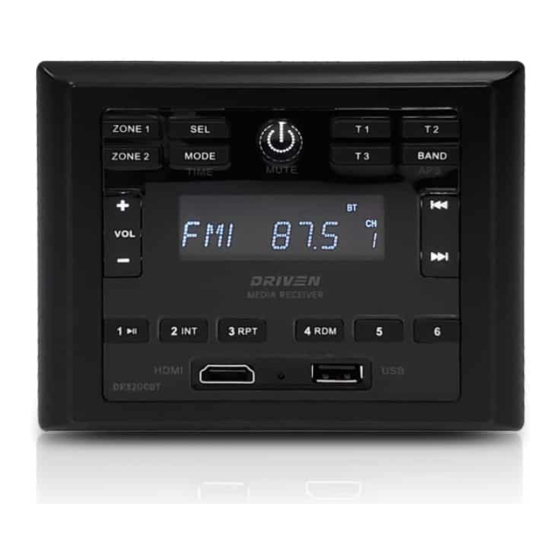

Diagrama del panel frontal

- Zone 1
Altavoces encendido/apagado - Zone 2
Altavoces encendido/apagado - Ajustes de sonido seleccionables
Bass/Trebble/Sub/Zone Volume/EQ (Graves/Agudos/Subwoofer/Volumen de zona/Ecualizador) - Mode (Modo)
USB/BT/HDMI/RADIO/AV1/AV2 (Pulsación corta para alternar entre fuentes) - Power On/Off — Mute (Encendido/Apagado — Silencio)
Pulsación corta para encender. Pulsación larga para apagar. (Pulsación corta con el equipo encendido para silenciar) - T1
LED del altavoz interior (Interruptor de salida T1, encender/apagar) - T2
LED del altavoz exterior (Interruptor de salida T2, encender/apagar) - T3
Función opcional (Interruptor de salida T3, encender/apagar) - Band/Tuner Selection (Selección de banda/sintonizador)
APS, FM1, FM2, FM3, AM1, AM2 - Volume (Volumen)
VOL+ / VOL- - Track Select / Radio Station Search (Selección de pista/Búsqueda de emisora de radio)
Anterior - Track Select / Radio Station Search (Selección de pista/Búsqueda de emisora de radio)
Siguiente - Play Pause / P1 (Reproducir Pausa / P1)
Modo Radio: Pulsación corta para seleccionar la emisora P1, Pulsación larga para guardar la emisora en P1. (Modo USB: Play (Reproducir) / Pause (Pausa)) - INT / P2
Modo Radio: Pulsación corta para seleccionar la emisora P2, Pulsación larga para guardar la emisora en P2. (Modo USB: Búsqueda de canciones) - RPT / P3
Modo Radio: Pulsación corta para seleccionar la emisora P3, Pulsación larga para guardar la emisora en P3. (Modo USB: Repetir lista de reproducción) - RDM / P4
Modo Radio: Pulsación corta para seleccionar la emisora P4, Pulsación larga para guardar la emisora en P4. (Modo USB: Aleatorizar lista de reproducción) - P5
Modo Radio: Pulsación corta para seleccionar la emisora P5, Pulsación larga para guardar la emisora en P5. - P6
Modo Radio: Pulsación corta para seleccionar la emisora P6, Pulsación larga para guardar la emisora en P6. - HDMI
Entrada - Reset (Reiniciar)
Pulse para reiniciar la unidad - USB
Entrada
Diagrama del mando a distancia

Note: DR3200REM optional remote available, sold seperately.
Nota: El mando a distancia opcional DR3200REM está disponible y se vende por separado.
Botones del mando a distancia
- Power (Encendido)
- Mute (Silenciar)
- Mode (Modo)
- Zone 1 (Zona 1)
- Zone 2 (Zona 2)
- Band (Banda)
- Forward (Adelante)
- Previous (Anterior)
- Play / Pause (Reproducir / Pausa)
- Volume (Volumen)
- Trigger Functions (Funciones de activación)
Instalación
Location (Ubicación)
- Choose a mounting location away from humid areas, water sources, burning products or any equipment that can radiate heat.
- Elija un lugar de montaje alejado de zonas húmedas, fuentes de agua, productos inflamables o cualquier equipo que pueda irradiar calor.
- Select an area on the wall or cabinet, which is free from cable, fuel or brake lines.
- Select an area on the wall or cabinet, which is free from cable, fuel or brake lines.
- Seleccione una zona en la pared o el armario que esté libre de cables, combustible o conductos de freno.
- Ensure when the stereo is mounted in the cut out that the wires at the rear of the unit are not pressed against the heat sink.
- Ensure when the stereo is mounted in the cut out that the wires at the rear of the unit are not pressed against the heat sink.
- Asegúrese de que cuando el equipo de música esté montado en el hueco, los cables de la parte posterior de la unidad no estén presionados contra el disipador de calor.
Installing the unit (Instalación de la unidad)
- Before finally installing the unit, connect the wiring temporarily and make sure the unit and the system function properly.
- Antes de instalar la unidad de forma definitiva, conecte el cableado temporalmente y asegúrese de que la unidad y el sistema funcionen correctamente.
- Fix the unit to the wall using 4 self-tapping screw as indicated in the illustration.
- Fix the unit to the wall using 4 self-tapping screw as indicated in the illustration.
- Fije la unidad a la pared utilizando 4 tornillos autorroscantes como se indica en la ilustración.

- Carefully remove the plastic frame from the front panel of the unit.
- Carefully remove the plastic frame from the front panel of the unit.
- Retire con cuidado el marco de plástico del panel frontal de la unidad.
- Fix the unit in place with the 4 included #8 pan head self-tapping screws.
- Fix the unit in place with the 4 included #8 pan head self-tapping screws.
- Fije la unidad en su lugar con los 4 tornillos autorroscantes de cabeza plana #8 incluidos.
- Replace the plastic from on the front panel of the unit.
- Replace the plastic from on the front panel of the unit.
- Vuelva a colocar el plástico en el panel frontal de la unidad.
Conexiones
Wiring Diagram (Diagrama de cableado)

Harness Pin Connections
Conexiones de los pines del arnés

4-Speaker (2 zone) Wiring
Cableado de 4 altavoces (2 zonas)

Note: All speakers must be connected as shown. If one wire is removed or improperly connected then all speakers on the relevant zone will not function as intended. Connection with incorrect speaker polarity will lead to poor sound quality or speaker damage.
Nota: Todos los altavoces deben conectarse como se muestra. Si se retira o se conecta incorrectamente un cable, todos los altavoces de la zona correspondiente no funcionarán como se espera. La conexión con la polaridad incorrecta del altavoz provocará una mala calidad de sonido o daños en el altavoz.
Funcionamiento
Funcionamiento común
- To power the unit On/Off
When the unit is powered Off (Apagada), it may be switched On (Encendida) by pressing the POWER (ENCENDIDO) button. When the unit is switched On (Encendida), press and hold the POWER (ENCENDIDO) button to switch it off. - To select a function mode
Press MODE (MODO) button repeatedly on on the front panel to select the corresponding mode. (FM/AM, AV1, AV2, BLUETOOTH, HDMI) - To adjust the volume level
During playback, press VOLUME+ (VOLUMEN+) or VOLUME- (VOLUMEN-) button on the front panel to increase or decrease the volume. - To mute or resume the sound
During playback, short press POWER (ENCENDIDO) button on the front panel to mute sound. Repeat this to disable mute function. - To check speaker output status and select speaker output
Short-press ZONE 1 (ZONA 1) or ZONE 2 (ZONA 2) button on the front panel to check the speaker output status.
Press and hold ZONE 1 (ZONA 1) or ZONE 2 (ZONA 2) button on the front panel to turn ON/OFF the corresponding speaker output, "Z 1 ON/OFF" o "Z 2 ON/OFF" will be displayed on the LCD. - To set the sound mode and menu
Press and hold SEL button to turn on BASS, then press SEL button repeatedly to select or circulate through TRE (treble), EQ OFF (FLAT/AMERICA3/AUSTRALIA/EUROPE), press VOLUME+/- to change the settings. Press SEL button to confirm your selection.- VOL LAST / VOL DEFA
VOL LAST (ÚLTIMO VOL): The last volume level setting will be saved automatically after the unit is swithced off, and restored after powered on.
VOL DEFA (VOL PREDET): Press SEL button on the front control panel, the AVOL mark will be displayed on LCD. Use VOLUME +/- to set the volume level as a constant value. - VOL LAST / VOL DEFA
In Radio mode, with the DX/LOCAL selection you can change the attenuator settings at the input stage of the radio. This selection helps to avoid overloading the radio when strong (local) stations are received. Select DX (DISTANT) mode to receive far/weak radio stations (highest sensitivity settings are enabled) and select LOCAL for very strong stations (which are located nearby).
NOTE: This button is only for FM reception. In AM mode, LOC is in valid.
- VOL LAST / VOL DEFA
- To display and adjust the time
Press and hold MODE button to display time.
Press and hold MODE button for ~ 2 seconds until the time displays then release and hold MODE button again until the hour begins to flash. Use VOLUME+/- button to adjust the hour. While hours is flashing, hold MODE button until minutes begin to flash then Use VOLUME+/- button to adjust the hour. - To reset the unit
- Press RESET button with a cuspidal object. The unit will be reset to factory default settings.
Funcionamiento de la radio
- To select radio band
Press BAND button repeatedly to select a desired radio band in sequence and circulating as:
-->FM1-->FM2-->FM3-->AM1-->AM2 - Para seleccionar la banda de radio
Pulse el botón BAND (BANDA) repetidamente para seleccionar la banda de radio deseada en secuencia y circulando como: -->FM1-->FM2-->FM3-->AM1-->AM2 - To search for radio station manually or automatically
- In radio mode, press << / >> button to search your desired radio stations up/down manually.
- Press and hold << / >> button to search for the strongest station up/down automatically. - Para buscar emisoras de radio manual o automáticamente
- En el modo de radio, pulse el botón << / >> para buscar sus emisoras de radio deseadas arriba/abajo manualmente.
- Pulse y mantenga pulsado el botón << / >> para buscar la emisora más fuerte arriba/abajo automáticamente. - To store current station or turn on a preset one
- If you want to store the current station, press and hold one of the digit butttons form 1~6 to store the current station on the designated preset. You can store up to 30 presets.
- If you want to store the current station, press and hold one of the digit butttons form 1~6 to store the current station on the designated preset. You can store up to 30 presets.
- Para guardar la emisora actual o encender una preestablecida
- Si desea guardar la emisora actual, pulse y mantenga pulsado uno de los botones de dígitos del 1 al 6 para guardar la emisora actual en el preajuste designado. Puede guardar hasta 30 preajustes.
- Press one of the 6 buttons from 1~6 to enter the preset station in current band.
- Press one of the 6 buttons from 1~6 to enter the preset station in current band.
- Pulse uno de los 6 botones del 1 al 6 para introducir la emisora preestablecida en la banda actual.
- To auto search and store the top 6 strongest stations In radio mode, press and hold BAND button on the front panel, the unit will start to search the available stations and check the signal strength from the lowest frequency. The top 6 strongest stations will be saved to the corresponding preset numbered band 1~6.
- To auto search and store the top 6 strongest stations In radio mode, press and hold BAND button on the front panel, the unit will start to search the available stations and check the signal strength from the lowest frequency. The top 6 strongest stations will be saved to the corresponding preset numbered band 1~6.
- Para buscar automáticamente y guardar las 6 emisoras más fuertes En el modo de radio, pulse y mantenga pulsado el botón BAND (BANDA) en el panel frontal, la unidad comenzará a buscar las emisoras disponibles y a comprobar la intensidad de la señal desde la frecuencia más baja. Las 6 emisoras más fuertes se guardarán en la banda numerada preestablecida correspondiente 1~6.
Funcionamiento del USB
- To insert or pull out the USB stick
To play the tracks in USB disk, insert the USB disk into the USB port. The playing mode will be changed to USB mode automatically and the USB indicator will be displayed on the LCD. - Para insertar o extraer la memoria USB
Para reproducir las pistas en el disco USB, inserte el disco USB en el puerto USB. El modo de reproducción cambiará automáticamente al modo USB y el indicador USB se mostrará en la pantalla LCD. - Press << or >> button to play previous or next track.
- Press << or >> button to play previous or next track.
- Pulse el botón << o >> para reproducir la pista anterior o siguiente.
- To fast forward or backward
Press and hold << or >> button to play backward or fast forward, release to resume normal playback. - To fast forward or backward
Press and hold << or >> button to play backward or fast forward, release to resume normal playback. - Para avanzar o retroceder rápidamente
Pulse y mantenga pulsado el botón << o >> para reproducir hacia atrás o avanzar rápidamente, suelte para reanudar la reproducción normal. - To play previous or next 10th track.
Press 5 or 6 button to play previous or next 10th track. - To play previous or next 10th track.
Press 5 or 6 button to play previous or next 10th track. - Para reproducir la pista anterior o siguiente. Pulse el botón 5 o 6 para reproducir la pista anterior o siguiente.
- How to use 1/PLAY/PAUSE button
During playback, press 1/PLAY/PAUSE button to pause playback,
Press 1/PLAY/PAUSE button again to resume,
Press and hold 1/PLAY/PAUSE button to select the first track to play. - Cómo usar el botón 1/PLAY/PAUSE (1/REPRODUCIR/PAUSA)
Durante la reproducción, pulse el botón 1/PLAY/PAUSE (1/REPRODUCIR/PAUSA) para pausar la reproducción,
Pulse de nuevo el botón 1/PLAY/PAUSE (1/REPRODUCIR/PAUSA) para reanudarla,
Pulse y mantenga pulsado el botón 1/PLAY/PAUSE (1/REPRODUCIR/PAUSA) para seleccionar la primera pista a reproducir. - To repeat track(s)
- During playback, press 3/RPT button briefly to play the current track repeatedly. RPT ONE will be displayed on LCD.
- Press RPT button twice to play the track(s) in the album repeatedly. RPT DIR will be displayed on LCD.
- Press RPT button three times to repeat all tracks. RPT ALL will be displayed on LCD.
- Press RPT button four times to cancel the RPT function, RPT OFF will be displayed on LCD. - Para repetir pistas
- Durante la reproducción, pulse brevemente el botón 3/RPT para reproducir la pista actual repetidamente. RPT ONE (RPT UNO) se mostrará en la pantalla LCD.
- Pulse el botón RPT dos veces para reproducir las pistas del álbum repetidamente. RPT DIR (RPT DIR) se mostrará en la pantalla LCD.
- Pulse el botón RPT tres veces para repetir todas las pistas. RPT ALL (RPT TODO) se mostrará en la pantalla LCD.
- Pulse el botón RPT cuatro veces para cancelar la función RPT (RPT), RPT OFF (RPT DESACTIVADO) se mostrará en la pantalla LCD. - To play tracks at random
During playback, press RDM button to play all tracks at random. Press it again to cancel. - To play tracks at random
During playback, press RDM button to play all tracks at random. Press it again to cancel. - Para reproducir pistas al azar
Durante la reproducción, pulse el botón RDM (ALEATORIO) para reproducir todas las pistas al azar. Púlselo de nuevo para cancelarlo. - To search a track
Press USB button, TRK 0/00/000 (depending on the total tracks that are saved in the USB disk) will be displayed on the LCD and the place marker in the 0 position will begin flashing.
After inputing your desired track, press 1/PLAY/PAUSE button to play the track to be selected. - To search a track
Press USB button, TRK 0/00/000 (depending on the total tracks that are saved in the USB disk) will be displayed on the LCD and the place marker in the 0 position will begin flashing.
After inputing your desired track, press 1/PLAY/PAUSE button to play the track to be selected. - Para buscar una pista
Pulse el botón USB, TRK 0/00/000 (dependiendo del total de pistas que se guarden en el disco USB) se mostrará en la pantalla LCD y el marcador de posición en la posición 0 comenzará a parpadear.
Después de introducir la pista deseada, pulse el botón 1/PLAY/PAUSE (1/REPRODUCIR/PAUSA) para reproducir la pista que se va a seleccionar.
Funcionamiento del Bluetooth
Emparejar y conectar
- Click the MODE button on the DR3200BT front panel to go to Bluetooth mode.
- Haga clic en el botón MODE (MODO) en el panel frontal del DR3200BT para entrar en el modo Bluetooth.
- You should see NOT PAIR displayed on the LCD. If you see BT LINK and the Bluetooth icon is on, that means DR3200BT is already connected to another device. You can clear it by pressing and holding the BT button for ~2 seconds until NO LINK is shown, then continue with the rest of the steps below.
- You should see NOT PAIR displayed on the LCD. If you see BT LINK and the Bluetooth icon is on, that means DR3200BT is already connected to another device. You can clear it by pressing and holding the BT button for ~2 seconds until NO LINK is shown, then continue with the rest of the steps below.
- Debería ver NOT PAIR (NO EMPAREJADO) en la pantalla LCD. Si ve BT LINK (ENLACE BT) y el icono de Bluetooth está encendido, eso significa que el DR3200BT ya está conectado a otro dispositivo. Puede borrarlo pulsando y manteniendo pulsado el botón BT durante ~2 segundos hasta que se muestre NO LINK (SIN ENLACE), y luego continuar con el resto de los pasos siguientes.
- Go to the Bluetooth menu of your device.
- Go to the Bluetooth menu of your device.
- Vaya al menú de Bluetooth de su dispositivo.
- Ensure Bluetooth is turned On.
- Ensure Bluetooth is turned On.
- Asegúrese de que el Bluetooth está encendido.
- Select the device named DRIVEN.
- Select the device named DRIVEN.
- Seleccione el dispositivo llamado DRIVEN.
- If the pairing and connection is successful, the mobile will show connected while DR3200 will show BT LINK and the Bluetooth icon on LCD.
- If the pairing and connection is successful, the mobile will show connected while DR3200 will show BT LINK and the Bluetooth icon on LCD.
- Si el emparejamiento y la conexión tienen éxito, el móvil mostrará conectado mientras que el DR3200 mostrará BT LINK (ENLACE BT) y el icono de Bluetooth en la pantalla LCD.
Note: DR3200BT supports NFC pairing. The NFC detection area is on the right of the Power button.
Nota: El DR3200BT es compatible con el emparejamiento NFC. El área de detección NFC está a la derecha del botón de encendido.
Desconectar y reconectar
- Bluetooth connection of mobile devices typically covers a 33 ft (10m) open-field range. DR3200BT "remembers" the last connected device. The unit will disconnect from any device that goes out-of-range, DR3200BT will auto-reconnect to your device once it is back in range.
- Bluetooth connection of mobile devices typically covers a 33 ft (10m) open-field range. DR3200BT "remembers" the last connected device. The unit will disconnect from any device that goes out-of-range, DR3200BT will auto-reconnect to your device once it is back in range.
- La conexión Bluetooth de los dispositivos móviles suele cubrir un rango de campo abierto de 33 pies (10 m). El DR3200BT "recuerda" el último dispositivo conectado. La unidad se desconectará de cualquier dispositivo que quede fuera de alcance, el DR3200BT se volverá a conectar automáticamente a su dispositivo una vez que esté de nuevo dentro del alcance.
- If you explicitly disconnect the Bluetooth link by pressing the corresponding menu item in your device the DR3200BT will not auto-reconnect.
- If you explicitly disconnect the Bluetooth link by pressing the corresponding menu item in your device the DR3200BT will not auto-reconnect.
- Si desconecta explícitamente el enlace Bluetooth pulsando el elemento de menú correspondiente en su dispositivo, el DR3200BT no se volverá a conectar automáticamente.
- If you turn off Bluetooth from your device while the unit is connected, DR3200BT will not auto-reconnect when you turn on the device's Bluetooth option. Some devices will try to reconnect with the last Bluetooth connected device.
- If you turn off Bluetooth from your device while the unit is connected, DR3200BT will not auto-reconnect when you turn on the device's Bluetooth option. Some devices will try to reconnect with the last Bluetooth connected device.
- Si desactiva el Bluetooth de su dispositivo mientras la unidad está conectada, el DR3200BT no se volverá a conectar automáticamente cuando active la opción Bluetooth del dispositivo. Algunos dispositivos intentarán volver a conectarse con el último dispositivo conectado por Bluetooth.
- However, if you turn off Bluetooth on the device after an out-of-range disconnection, DR3200BT will auto-reconnect once you turn on Bluetooth on the device when it is within range.
- However, if you turn off Bluetooth on the device after an out-of-range disconnection, DR3200BT will auto-reconnect once you turn on Bluetooth on the device when it is within range.
- Sin embargo, si desactiva el Bluetooth en el dispositivo después de una desconexión fuera de alcance, el DR3200BT se volverá a conectar automáticamente una vez que active el Bluetooth en el dispositivo cuando esté dentro del alcance.
- Note that whenever disconnected, the DB3200BT can be paired and connected by any other Bluetooth device.
- Note that whenever disconnected, the DB3200BT can be paired and connected by any other Bluetooth device.
- Tenga en cuenta que siempre que se desconecta, el DB3200BT puede ser emparejado y conectado por cualquier otro dispositivo Bluetooth.
Olvidar (o desemparejar)
- You can explicitly forget (or unpair) DB3200BT in mobile. If you do that while connected in range, DB3200BT will be properly notified and all settled.
- You can explicitly forget (or unpair) DB3200BT in mobile. If you do that while connected in range, DB3200BT will be properly notified and all settled.
- Puede olvidar (o desemparejar) explícitamente el DB3200BT en el móvil. Si lo hace mientras está conectado dentro del alcance, el DB3200BT será notificado correctamente y todo se resolverá.
- If you do that after being disconnected while out-of-range, DB3200BT will still auto connect with the device. If this happens, you can press and hold the BT button for ~2 seconds on DB3200BT to clear its memory.
- If you do that after being disconnected while out-of-range, DB3200BT will still auto connect with the device. If this happens, you can press and hold the BT button for ~2 seconds on DB3200BT to clear its memory.
- Si lo hace después de haber sido desconectado mientras está fuera del alcance, el DB3200BT seguirá conectándose automáticamente con el dispositivo. Si esto ocurre, puede pulsar y mantener pulsado el botón BT durante ~2 segundos en el DB3200BT para borrar su memoria.
Reproducción de audio
- When audio is streamed from mobile to DB3200BT, BT AUDIO is shown on the LCD.
- When audio is streamed from mobile to DB3200BT, BT AUDIO is shown on the LCD.
- Cuando el audio se transmite desde el móvil al DB3200BT, se muestra BT AUDIO en la pantalla LCD.
- You can control the trick modes (play, stop, next, prev) either from your device or DB3200BT.
- You can control the trick modes (play, stop, next, prev) either from your device or DB3200BT.
- Puede controlar los modos trick (Play (Reproducir), Stop (Parar), Next (Siguiente), Prev (Anterior)) desde su dispositivo o desde el DB3200BT.
- If you hear no sound or very low volume output, please check the volume on your device, then adjust the volume on the DB3200BT to the level of your choice.
- If you hear no sound or very low volume output, please check the volume on your device, then adjust the volume on the DB3200BT to the level of your choice.
- Si no oye ningún sonido o el volumen de salida es muy bajo, compruebe el volumen de su dispositivo y, a continuación, ajuste el volumen del DB3200BT al nivel que desee.
Especificaciones
General (General) Supply Voltage DC 12V Supply Voltage DC 12V Tensión de alimentación DC 12V Current Consumption Max. 5A Current Consumption Max. 5A Consumo de corriente Máx. 5A Power Output 4 x 9 W RMS
(4 Ohm speakers)Power Output 4 x 9 W RMS
(4 Ohm speakers)Potencia de salida 4 x 9 W RMS
(altavoces de 4 ohmios)Number of Channels 4 Channels Number of Channels 4 Channels Número de canales 4 canales Mounting Dimensions
(W x H x D)3.80 x 3.80 x 3.14 in
96.7 x 96.7 x 79.8 mmMounting Dimensions
(W x H x D)3.80 x 3.80 x 3.14 in
96.7 x 96.7 x 79.8 mmDimensiones de montaje
(An x Al x Pr)3.80 x 3.80 x 3.14 in
96.7 x 96.7 x 79.8 mm⠀
AM Section
Descargar el manual
Aquí puede descargar la versión PDF completa del manual. Puede contener instrucciones de seguridad adicionales, información de garantía, reglas de la FCC, etc.
Descargar Manual del DRIVEN DR3200BT